
You don’t get to be a CEO without taking some chances, but there is a difference between taking on risk in search of an outsized reward and taking on unnecessary, avoidable risks. In an era when so much of business depends on data and computing, the proactive CEO values a solid business continuity and disaster recovery (BCDR) plan. After all, why would a leader risk the damage that could be done by failure to recover quickly from a systems outage, the destruction of a facility, a ransomware attack , or the loss of critical data? Unfortunately, the necessity of BCDR is not apparent to everyone. To help you justify the investment, here are four critical reasons that you, the CEO, should care about business continuity and disaster recovery.
1. Because Downtime is Expensive
If your employees lose access to business-critical applications and data, there is a direct impact on productivity and revenue. While this sounds obvious, many organizations do not consider the total cost of downtime. To better understand how the damage adds up, consider the following example created with Datto’s Recovery Time and Downtime Cost calculator . Let’s say your business has 100 employees, the average hourly revenue is $1,500, and the backup data set amounts to 2 TB. Given these parameters, a full restore from a local backup would take over 8 hours. The associated downtime cost would amount to $34,000 in lost revenue. Modern BCDR products can quickly launch a virtual instance of an application and all its data on a virtual server hosted within the backup environment. This lets users continue operations while primary application servers are restored. Choosing a BCDR solution that minimizes downtime makes good business sense.
2. Because Backup Alone is Not Enough
Backup and business continuity are not the same. You’d be hard-pressed to find a business today that doesn’t conduct some form of data backup . But what happens if a flood wipes out your primary and backup servers? You need to know the systems your business relies on will continue to operate, no matter what. Sending a copy of data offsite for disaster recovery is one way to ensure business continuity. Historically, this meant sending tapes to a secondary location or tape vault. Today, BCDR solutions can run applications from backup instances of virtual servers. The best of them extend this capability to the cloud—an approach known as disaster recovery as a service (DRaaS). The ability to run applications in the cloud while onsite infrastructure is restored is a game-changer for disaster recovery. As CEO, you don’t want yesterday’s backup technology.
3. Because Disasters Take Many Forms
Not every disaster is broadcast on news and weather channels. Most IT downtime is a result of common, accidental (or malicious) data deletion, damage to computer hardware, or poor security habits. For example, a recent OWI Labs survey found that 81% of respondents occasionally or regularly use public WiFi, despite security risks. A ransomware attack or virus can halt operations just as easily as a tornado or a power surge. These “lowercased” disasters are typically a result of human error, which is unpreventable. Having technology in place that allows your business to continue operations following these man-made disasters is equally, if not more important than protecting against a hurricane that may or may not strike your business.
4. Because Resilience Matters
Ensuring access to applications and data following a disaster is just one piece of the BCDR puzzle. Evaluating your business’s ability to restore IT operations can be a good starting point for company-wide business continuity efforts, but good BCDR planning should look at the business as a whole, and the goal should be to develop business resilience, in addition to cyber resilience. In fact, many BCDR planning efforts start by conducting a business impact analysis or risk assessment — these studies can reveal weaknesses in your business’s ability to continue operations that go far beyond IT. You know a disaster (natural or otherwise) will be coming to your company at some point. When it does, you want to be as well-prepared as possible.
Conclusion
Business continuity and disaster recovery is a company-wide responsibility and failure to protect your business from human error, hardware failure, and/or natural disasters can be detrimental and impact every stakeholder. Once you’ve implemented a solid BCDR plan, you will sleep better knowing you’re fully prepared for any disaster that might come your way. We can help give you that assurance. Working with Datto, we ensure complete, ransomware-free backups and rapid data restoration. The Datto Cloud is immutable, so it’s always possible to recover a clean copy of a file, email, or an entire server. Backups are protected against ransomware, data corruption, and files or emails being accidentally or maliciously deleted. Care to learn more? Contact us today .
In the last few years, the threat of cyberattacks has grown exponentially, and it’s continuing into the new year, threatening cybersecurity measures. By September of 2021, the total number of attacks exceeded all of 2020 . Unfortunately, there’s no sign of slowing down, especially if businesses remain content with the way things are. However, you can break that cycle with the right tools and knowledge. Let’s talk about some cybersecurity trends to watch in 2022 and how you can keep your business safe.
Cybersecurity Trends To Look Out for in 2022
Small businesses are such a large target for cyberthreats because they are in the “sweet spot” for potential attackers. Large companies like Apple or Facebook have major prizes to steal, but their systems are too strong for an average hacker to infiltrate. Conversely, someone’s personal computer may be easy to infiltrate, but it won’t have a big enough prize for the attacker. That puts small businesses without a robust cybersecurity plan in the perfect zone for attackers, which is why preparation is so necessary. Here’s what you need to watch out for this year.
Phishing Scams Will Become More Sophisticated
You probably trust your employees not to send your company’s data to a Nigerian prince who’s strapped for cash, but times have changed. Sure, we all see those social engineering scams in our junk folder and think to ourselves, “Who falls for this?” However, phishing scams are becoming difficult to detect with the rise of deep-fake technology in 2020 through 2021. Scammers are learning to use this technology to replicate staff email addresses, voices, profile pictures, video chats, and more. Unfortunately, this allows them to do far more damage to a company.
Ransomware Attacks Will Continue to Evolve
Ransomware as a service (RaaS) is an evolving tool that is becoming a real thorn in the side of small businesses. Essentially, hackers use this software to cripple your data and only release it upon payment, often exceeding six figures. Unfortunately, this technology is only expanding as we speak. Once it’s in your network, there’s little you can do about it.
Coverage of Unstructured Data Will Expand
Currently, most data is considered unstructured, although most data warehouses are only equipped to cover structured data. Because unstructured data is so widely available for attackers, many of them have become more willing to sort through stacks of it to find the needle in the haystack. Consequently, safe data storage will need to expand to include coverage for unstructured data, which is already happening.
Safe Cloud Storage and File Sharing Will Become More Available
More and more, small businesses are getting the picture. They are adopting safe cloud storage and remote file sharing at record rates in response to the rise of cyber threats and remote work. If you have remote staff, then cloud storage, safe file sharing, and a virtual private network (VPN) should play a significant role in the new year for you and your staff.
What You Can Do to Protect Your Business
Your business needs to be prepared to prevent a wannabe attacker from infiltrating your system and what to do if they are successful. Generally speaking, it takes the average company over 191 days (over half a year) to notice a breach. Imagine how much damage can be done in that time.
Staff Training
Training your employees is the only way to protect against phishing scams. You can have all the security in the world, but if somebody with access to your company’s data is convinced to give it up, it will tank your business. Consequently, training your staff to identify suspicious behavior and report it to the proper authorities is the only way to protect your business from these scams.
Staff Protocols
Part of training your staff should involve teaching them the right protocols, and not just for reporting suspicious activity. There should be strict protocols for secure file sharing, what information needs to be sent through which outlet, and following up with people in person. Unfortunately, there’s no concrete way to prevent staff members from sharing a file if they believe that the email they received was from their supervisor, coworker, or someone who should have access to these files. As a result, staff should be trained to double-check or follow up in person when sharing essential data.
Disaster Relief Plan
Resilience is key to cybersecurity. Again, you can’t prevent everything. However, the average cyberattack costs businesses over $200,000, which generally leads to them shutting down. Having a plan in place to notice and isolate a breach, stop the damage, and allow for business continuity is critical to the survival of your business in this age.
Cybersecurity Services
Only a few small businesses can afford to hire an in-house cybersecurity team, which isn’t always necessary. Conversely, most small businesses can afford to hire outsourced cybersecurity solutions, which can save their business. In 2022, the best investment you can make is to protect your most valuable data with a reliable data backup and recovery solution.
Keep Your Data Safe
Now that you know some of the most pressing cybersecurity trends of the new year, you can keep your business safe for the long haul. The sooner you invest in your data’s security, the less time you will spend at risk of attack. Stay up to date with our latest business continuity tips, and contact us with any questions.
Hurricane season officially starts on Saturday, June 1, and is expected to get more intense later in the summer when things heat up. NOAA defines June 1-Nov. 30 as the timeframe for the hurricane season because it includes more than 97 percent of tropical cyclones. However, there’s a reason that 3 percent exists. Subtropical storm Andrea made a brief appearance to the southwest of Bermuda on May 20.

Based on NOAA’s outlook, it’ll be a near-normal Atlantic hurricane season with a 40% chance of a near-normal season, a 30% chance of an above-normal season, and a 30% chance of a below-normal season.
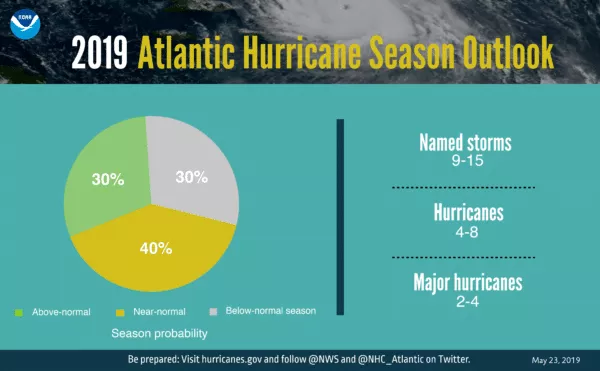
It’s with a 70% confidence that NOAA ranges named storm from nine to 15 with winds of 39 mph or higher. Four to eight of these storms could grow into hurricanes with winds of 74 mph or higher, and two to four major hurricanes.
Create a Plan That Addresses the Entire Business
There’s a common misconception that business continuity planning only affects the IT department. In fact, whether you create a business continuity plan (BCP) internally or choose to outsource it, your BCP should involve strategies for getting critical processes and departments up and running again. If you already have a BCP in place, third-party consultants can provide an objective view of your business and make suggestions for your BCP so that your plan is effective when interruptions occur. Business continuity as a service (BCaaS) uses the expertise of professionals to develop and manage a specific plan tailored to your business’ needs. With a streamlined course of action, your business will be able to remain operational in the event of a disaster.
Prepare Alternate Workspaces
Whether there’s physical destruction to your building or employees and customers are unable to travel, damages from disasters can hinder your ability to maintain normal business activities in your primary office space. If you need to relocate business operations , make sure you have access to an alternate workspace as soon as possible. Fully equipped alternative workspaces like Mobile Recovery Centers (MRCs) can be made available within as little as 24-48 hours of a disaster declaration, while Fixed-site Business Recovery Centers (BRCs) can be made available within as little as four hours of a declaration. Once the alternate location is set up, your company can begin to restore business operations successfully.
Back up and Recover Your Data
Having access to your data and applications is imperative when disaster strikes. A fully managed and monitored cloud recovery platform will protect your IT infrastructure. With secure data vaulting and recovery , your data will be recoverable on- or off-site within your recovery time objectives.
How will you respond when ransomware targets your business? We say “when” because 71 percent of cybersecurity experts believe there’s a moderate to extreme possibility their organizations will experience ransomware attacks in the next 12 months. Here are our top recommendations for protecting your data against ransomware in 2019.
Ransomware in the Cloud
Nearly 44 percent of the malware found in the cloud is carrying ransomware, and in 2017, attacks against cloud storage increased. This threat is exacerbated by the fact that cloud applications are available on demand. Any employee can go online, sign up for a free service, and download infected software. If they share a service with other employees, the infection can rapidly spread to other systems, thanks to the sync-and-share functionality that’s common to many cloud applications. Your risk increases if employees access data stored in the cloud using personal devices that aren’t properly maintained, patched, and updated. To reduce ransomware threats from shadow IT, make sure you have a bring-your-own-device (BYOD) policy in place, look for unusual activity on the network, and follow the rest of our tips below.
Patch Everything
The WannaCry attack infected more than 200,000 computers in 150 countries — all by exploiting vulnerabilities in older Microsoft operating systems. In fact, as Webroot’s VP of cybersecurity and engineering points out, many of 2017’s ransomware attacks could have been mitigated simply by patching systems. It’s worth noting that the colossal Equifax breach — although not a ransomware attack — was reportedly caused by an employee’s failure to apply a software patch . To thwart criminals exploiting known vulnerabilities in trusted applications, the solution is simple (though admittedly easier said than done): Patch everything. Patch your applications, software, hardware, and connected devices as soon as updates are available.
Train Employees
Timely employee training is one of the most effective ways to combat ransomware, as it typically enters the organization through an employee opening a compromised email attachment, falling for a phishing email, or visiting a compromised website. It’s getting harder to spot scams because scammers are skilled at harvesting data from social networks and other online researchers to spoof an email from a well-known brand or impersonate trusted content. In fact, spoofing and impersonation comprise 67 percent of successful phishing attacks. Spammers are also hijacking legitimate domains , which they use to create phishing pages. The sites’ good reputations allow the newly created phishing pages to slip past anti-phishing filters. However, these are only two examples of a growing list of phishing tactics. That’s why it’s important to regularly train employees on how to look for the telltale signs of phishing attacks. Training should be mandatory, but to fully engage employees, communicate the message that they’ll learn valuable cybersecurity skills to apply in their personal lives. After all, phishing and ransomware target individuals too.
Maintain Backups and Test Your Restore Process
If all else fails and your data is encrypted, having current backups is the best defense against ransomware. By restoring from backups, you can avoid paying the ransom. That’s why, unfortunately, some strains of ransomware are now going after backups, especially if they’re stored in the same environment as your production systems. WannaCry , for example, deleted volume shadow copies, which Microsoft Windows automatically creates to allow users to easily recover their data. Network-attached backups are also at risk. After having its data encrypted by ransomware, one police station refused to pay the ransom , knowing that its data was backed up. Unfortunately, the backups were attached to the network and had also been encrypted. To protect yourself, back up your data frequently and segregate it from your production environment. Be sure to monitor backups for completeness and accuracy as well. Of course, a backup is only as good as the restore, so it’s important to routinely test your restore process. Include any disaster recovery vendors you work within your tests to make sure they can restore your company’s data within your recovery time objectives (RTOs ).
Know How You’ll Respond to a Ransomware Attack
While you’re working on restoring your systems after a ransomware attack, a comprehensive business continuity plan with a strong focus on cybersecurity can minimize the impact of downtime. For example, will you need to temporarily revert to paper-based processes? Will workflows need to be diverted? If so, know in advance when, how, and where you’ll carry out the recovery. Finally, employees should be trained on any systems and procedures to be used during downtime. Don’t waste any time creating a response plan. Get started now. For more details, read our blog post “ Five Ways to Thwart a Cybersecurity Nightmare .”
Company Profile
- Industry: Insurance
- Company Size: Mid-sized regional insurer (500+ employees)
- Location: Headquarters in Chicago, with satellite offices across the Midwest
- IT Infrastructure: Cloud-based policy management system, on-premises file servers, VoIP phone systems
- Regulatory Compliance: SOC 2, PCI DSS, HIPAA (for health-related policies)
The Challenge: Phishing Attack Compromises Critical Systems
In early February, the insurance company fell victim to a sophisticated phishing attack targeting employees in the claims processing department. A fraudulent email, appearing to come from the company’s CFO, instructed recipients to log in to a fake security portal.
Within hours:
- Multiple employee credentials were stolen, giving attackers access to the internal document management system.
- Sensitive customer data (SSNs, financial details, and medical policy records) was exfiltrated.
- The company’s email system was locked down, preventing customer service representatives from accessing important policy information.
- VoIP phone systems were compromised, preventing inbound and outbound calls.
- IT security shut down key systems to prevent further spread, causing a complete halt in operations.
With customer data at risk, the company needed an immediate recovery plan to continue serving policyholders and mitigate reputational damage.
The Solution: Agility’s On-Demand IT Equipment & Data Recovery to Ensure Business Continuity
The insurance company activated its Agility Recovery membership, and within hours, a comprehensive IT recovery plan was deployed:
1. Immediate Deployment of Replacement IT Equipment
- Laptops and workstations shipped overnight to enable remote employees to resume work.
- Pre-configured cloud-based workstations deployed to access backup systems securely.
- Temporary secure email platform established to restore communications.
2. Secure Network & Communications Restoration
- Dedicated VPN and satellite internet provided for secure remote access.
- VoIP phone system replacement enabled customer service agents to assist policyholders.
- Multi-factor authentication (MFA) protocols enforced to prevent further breaches.
3. Data Recovery & Compliance Support
- IT teams worked with Agility to restore access to encrypted data.
- The company used Agility’s cyber tabletop exercise templates to refine its incident response plan.
- Compliance support ensured adherence to SOC 2, PCI DSS, and HIPAA standards during recovery.
Outcomes & Business Benefits
- Operations resumed within 24 hours, preventing major revenue loss.
- Customer support was restored, minimizing policyholder frustration.
- No regulatory fines or penalties—compliance requirements were met.
- Executive team used this incident to justify investment in ongoing cybersecurity resilience.
Conclusion
This phishing attack could have crippled operations for weeks, but with Agility’s on-demand technology and data recovery solutions, the insurance company recovered rapidly, protected its reputation, and minimized financial impact.
Key Takeaways:
- Fast IT Equipment Deployment—Laptops, servers, and workstations arrived within hours.
- Secure Connectivity Restored—VPN and satellite solutions enabled remote access.
- Compliance & Risk Mitigation—Adherence to SOC 2, PCI DSS, and HIPAA standards.
- Minimal Business Interruption—Operations resumed within 24 hours instead of weeks.