The healthcare industry is facing unprecedented threats. The sector, including hospitals and medical facilities, has been identified as one of the most vulnerable to cyberattacks.
Almost 50 million patient records were affected by a major healthcare data breach in 2021 . In one of the latest, Tenet Healthcare reported an April cyberattack they estimate would cost $100 million to mitigate. Tenet Healthcare is a large healthcare organization headquartered in Dallas, Texas, with 60 hospitals, 465 ambulatory surgery centers, and 110 other outpatient centers. Tenet Healthcare was the victim of a cyberattack that caused significant IT outages. Tenet "immediately suspended user access to affected information technology applications, implemented extensive cybersecurity protection protocols, and swiftly took steps to restrict further unauthorized activity," according to a notice dated April 26.
Threats in Healthcare Cyberattacks
Recently, the healthcare industry has been under attack by cybercriminals. Forty-five million individuals were impacted by healthcare-related cyberattacks in 2021, up from 34 million in 2020. According to one report , which examines breach data reported to the US Department of Health and Human Services (HHS) by healthcare organizations, this number has tripled in just three years, rising from 14 million in 2018 to 42 million in 2019. The total number of individuals affected has increased by 32% since 2020, indicating that more records are compromised annually. The healthcare sector is a target for hackers because of the widespread use of electronic medical records and other sensitive data that can be used for financial gain or to perpetrate identity theft. The following are some areas that these attacks have impacted:
- – Patient privacy: Health information is highly personal and confidential. Hackers can use this data to steal identities, blackmail individuals, and/or extort them using private information such as social security numbers. They may also sell your health information on dark web marketplaces to bad actors who want to commit fraud or extortion against you or your family.
- – Medical records: This includes patient files like lab reports; X-rays; physician notes; prescription information etc., stored in both hard copy format as well as digital form. These documents contain sensitive information about a person’s medical history, including their disease status, treatment regime details, etc., which could lead to identity theft if an unauthorized party with malicious intent is accessed.
How Are Cyberattacks Affecting the Healthcare Industry?
Cyberattacks on healthcare organizations can result in a loss of life and cause a loss of money, reputation, and data. In the most recent cyberattack on healthcare facilities, hackers gained access to patient medical records at hospitals across the US and Canada. In some cases, they could potentially steal credit card information from patients who used their cards at those facilities. This fraud is just one example of how cyberattacks can negatively impact your business continuity strategy.
How Business Continuity Planning and Disaster Recovery Can Help Mitigate the Effects of Cyberattacks
Cyberattacks are evolving and becoming more sophisticated. To ensure your critical systems are protected, you must establish a business continuity management plan (BCMP). Business continuity planning is developing systems of prevention and recovery to protect an organization from potential threats. It's the framework for establishing organizational resilience and preparedness; business continuity planning aims to ensure continued operations before, during, and after an incident.
- – Identify and prioritize business processes to define the plan(s) you require; conduct a risk assessment to identify and quantify threats.
- – Define your business continuity strategy and develop a plan.
- – Maintain the program – update risk assessments, business impact analyses, and plans; ensure awareness and validate plans with regular exercises.
Business Continuity Plans Help Keep You Running in the Event of a Cyberattack
Business continuity plans (BCP) are an essential step toward ensuring your organization's ability to recover from a cyberattack. A BCP defines how a company will maintain operations during an interruption. A robust BCP aims to keep a company's core processes operational during a disaster and minimize downtime. A business continuity plan may consider various scenarios, including natural disasters, wildfires, cyberattacks, workplace violence, and isolated incidents.
Three Strategies To Mitigate Healthcare Cyberattacks
Three key strategies can help keep you running in the event of a cyberattack :
Emergency notifications
Emergency notification systems are indispensable when responding to a disaster and restoring operations after a disruption. Part of these plans should include alerting employees about security incidents so they know how best to proceed until IT personnel can get things back up and running. For instance, the repercussions could be severe if a cyberattack occurred in an office where employees lacked the necessary training and did not immediately report the incident. It would be impossible to maintain business continuity, and the organization could suffer significant property, asset, and resource loss.
Disaster recovery as a service (DRaaS)
If your company relies heavily on technology, purchasing additional backup data storage services from external providers might be wise in case something goes wrong at your office location(s).
Business Continuity Plans Are Critical for Hospitals
With the rise of ransomware and other cyberattacks, it's more important than ever for hospitals to have a business continuity plan in place. BCPs help an organization continue operations after a disaster or other disruptive event. However, according to research commissioned by IBM and Ponemon Institute , only 43% of healthcare organizations surveyed had documented business continuity plans, putting them at risk of experiencing significant downtime. When you think about your own healthcare experience as a patient, you probably want:
- – A hospital that is free from infection
- – A hospital with competent employees who know how to care for you
- – A hospital that will be able to ensure your privacy
A business continuity plan helps ensure these things are possible during an emergency like a cyberattack.
Conclusion
The healthcare industry is being hit hard by cyberattacks, but there are ways to protect your organization. Developing a business continuity and recovery strategy is a strong first step, but testing that plan is critical to your recovery success. Need help getting started? Agility Recovery is here to help .
Employees of Hollywood Presbyterian Medical Center received a nasty surprise when they discovered that a hacker had infiltrated the network and taken the computer systems hostage using ransomware. In exchange for the decryption key, the hacker demanded 40 bitcoins, which was approximately $17,000 at the time. In the interest of restoring the network quickly, the CEO decided to pay the ransom.
The hospital reported that patient care wasn’t compromised, but the incident is yet another example of the sobering prevalence and potential impact of cybersecurity threats.
While some organizations are greater targets for cybersecurity breaches because of the type of data they handle and its value on the black market (healthcare and financial organizations are prime targets), no business is impervious to cybersecurity threats. Here are five of the most important things you can do to prevent or minimize the impact of a cybersecurity breach on your company.
Protect the Perimeter
The most effective way to prevent the spread of malware is to thwart it before it penetrates the network. This might seem obvious, but even big firms lack adequate security protection. Make sure your business uses a perimeter anti-virus that can filter out viruses at the network edge in a complementary manner to PC-based anti-virus services.
Sometimes, though, even if a business is using anti-virus software, malware breaches the perimeter and resides in the network unnoticed. That’s what happened in the infamous Anthem breach — the hack is estimated to have started as early as April 2014, but it wasn’t discovered until January 2015. To prevent an ongoing breach, implement intrusion prevention services that inspect, quarantine, and log any suspicious activity.
Beware of Outdated Software
In a recent survey, Cisco technicians analyzed 115,000 of its devices installed in customer environments, viewing them as they would be seen from the Internet. They discovered that 92 percent of the devices examined were running software with 26 vulnerabilities on average. They also found that some customers in financial, healthcare, and retail sectors were running outdated software.
Because software updates usually include patches for newly discovered vulnerabilities, running earlier versions of the software could leave your network susceptible to a security breach. Be sure to install updates as soon as they’re available.
Protect Data
As one senior managing consultant for an e-discovery firm points out, just because a hacker is successful at breaching your network perimeter doesn’t necessarily mean your critical or sensitive data has been compromised.
To protect your sensitive data, however, it needs to be encrypted. You should also maintain full backups of your IT environment. Backups are crucial if your network is taken hostage by ransomware, as Hollywood Presbyterian Center’s was. In this scenario, you can avoid paying the ransom by restoring your network from a backup. As a caveat, this strategy won’t work if your backups have also been infected by malware — another reason having intrusion detection services is important.
Educate Staff
Human error accounts for about 52 percent of the root cause of security breaches. When it comes to cybersecurity specifically, phishing is a major culprit. Most computer-literate people are aware that they shouldn’t click links in suspicious emails or enter information on web pages that appear untrustworthy, but hackers are becoming more sophisticated in their methods, and it’s becoming harder for people to spot phishing attempts.
Whaling is especially notorious for scamming employees. In this phishing method, highly customized emails containing the target’s name, job title, or other information are sent to a high-profile recipient (usually a C-level executive) from a source that mimics a person or entity the recipient is familiar with.
To help your employees avoid making a critical error or being duped by hackers, make sure you educate employees on handling sensitive data with care and on how to identify phishing emails. Also, give them a clearly outlined process for reporting any suspicious emails.
Give Employees a Secure Way to Work Remotely
It’s rare nowadays for a company not to have some employees that work remotely at least part of the time. However, if those employees connect to public Wi-Fi networks to do their jobs, they’re putting your company data at risk if they don’t take the proper precautions.
Ideally, your employees should have the ability to access your network through a company virtual private network (VPN), which encrypts traffic between the employee’s device and the business’s network.
These recommendations are only scratching the surface of a thorough, effective cybersecurity plan. For more tips, review the Federal Financial Institutions Examination Council (FFIEC) Cybersecurity Assessment Tool.
When you created your business continuity plan, you were probably thinking about what would happen if the building burned down or flooded. These kinds of natural disruptions are easier to anticipate. But what will you do in the event of a ransomware attack?
If you’re not already planning for this kind of event, you should start soon. Business continuity planning can help you lessen the impact of information theft.
What Are Ransomware Attacks?
Ransomware attacks are a form of hacking that perpetrators use to ask for compensation to return your files. Somehow, they have gained access to your databases and encrypted all the information, rendering it useless. These hackers will then typically ask for a sum of money to decrypt your files. If you don’t pay, the price will increase, or they’ll leak everything they’ve collected.
While the most obvious targets might be big businesses, smaller businesses often find themselves vulnerable. Department of Homeland Security Secretary Alejandro Mayorkas said that small businesses account for up to 75% of ransomware attacks. So how do hackers gain such easy access to business data?
These attacks often start through phishing scams and drive-by downloading. Hackers will send fake emails telling you your password has been compromised or you’ve won a huge prize. Once they get you to click on the link, they can access your new password or download malware onto your device. They could even gain access from company laptops and phones that haven’t been secured before selling or discarding.
How Business Continuity Planning Can Help
So, what can be done to reduce the damage brought by ransomware attacks? This is where establishing a business continuity plan and recovery strategy will be a tremendous asset.
1. Details How Long Operations Will Be Down
Part of your continuity plan will be determining how long it will take to get your information back. If you’ve been regularly scheduling backups of your computers, you will be able to restore them in however long your IT team believes it will take.
However, the cost of not performing backups could be very high. While the ransom cost could be low, the average business took about one month to recover from an attack — and if your business is down for more than five days, there’s a 90% chance it will go out of business within a year. Figuring out how long your services will be down will mean the difference between getting back to normal or closing your business.
2. Establishes Whether You’ll Need to Pay the Ransom
By choosing beforehand if you will pay the ransom, you can react accordingly to the situation. By deciding not to pay the ransom, you may choose to perform routine backups and keep data stored in a way you can access. If you opt to pay for your information, you’ll need to plan what to do if hackers refuse to give you all your material back.
3. Lessens Overall Costs
After preparing for these scenarios, you can lower how much a ransomware attack can cost you. Instead of losing out on an entire month of business, business continuity planning can help you get back up and running in much less time. Having a plan in place may mean not paying the ransom at all. Only 61% of encrypted data, on average, is returned if victims hand over the money.
How to Develop a Plan
Once you’ve seen what ransomware attacks can do to your business, you might be more interested in developing a comprehensive business continuity plan. Here are a few preventive measures and steps you can take.
1. Use Zero-Trust Security Architecture
Many businesses use a castle-and-moat security model. This means no one outside the network is allowed access to anything, but anyone within the organization is. This is flawed because hacks could come from within your network.
Zero trust means everyone attempting access is seen as a potential threat. It establishes trust based on identity, so hacks are easier to prevent, and breaches are more easily located.
2. Use Software and Hardware Against Attacks
With a solid plan for the worst-case scenario, you can prevent the worst from happening. Use anti-malware systems to stop any outside entities from infecting your system.
If something malicious still gets through, you can have both hardware and software firewalls to prevent access to sensitive information. If you anticipate ransomware attacks, you can know how best to hinder hackers.
3. Describe How Long Recovery Will Take
If you’ve still been hacked after deploying these security methods, establish how to begin restoring your data. Figure out the length of time you can be non-operational before it starts to affect you adversely. Find out when the attack occurred and how far back you’ll be able to restore information. Identify how long it will take to erase all malware and reinstate your backups.
Finally, analyze the time it will take to re-enter any lost data. Once you prepare these strategies, you’ll be better equipped to deal with attacks.
4. Perform Frequent Backups
Backups are the best way to restore your data without having to pay a ransom. However, you need to perform backups frequently in order to make them effective in an attack.
How often you do them depends on how much you think gets done in a day, a week, or a month. Would losing even a day’s worth of data be detrimental? If so, you’ll want to consider backing up your computers each day. Also, decide whether you’ll use on-site storage, cloud storage, or both.
5. Disaster Recovery as a Service
More commonly known as DRaaS, this is another form of information backup. Disaster recovery as a service stores your entire infrastructure, meaning you can continue to operate from your service provider’s cloud.
This can help if the time it will take to delete the malware and reinstate backups is too long. Then, once your servers have been restored, any processing or data is transferred to them. DRaaS means you can continue operations almost instantly while working on fixing your home base.
Test Your Recovery Plan to Reduce Ransomware Impacts
When dealing with a ransomware attack, prevention is the best step. Business continuity testing is the best way to fail-safe your strategy and confirm that you will meet your recovery time objective.
Zac Amos is the Features Editor and a writer at ReHack, where he loves digging into business tech, cybersecurity, and anything else technology-related. You can find more of his work on Twitter or LinkedIn.
In the last few years, the threat of cyberattacks has grown exponentially, and it’s continuing into the new year, threatening cybersecurity measures. By September of 2021, the total number of attacks exceeded all of 2020 . Unfortunately, there’s no sign of slowing down, especially if businesses remain content with the way things are. However, you can break that cycle with the right tools and knowledge. Let’s talk about some cybersecurity trends to watch in 2022 and how you can keep your business safe.
Cybersecurity Trends To Look Out for in 2022
Small businesses are such a large target for cyberthreats because they are in the “sweet spot” for potential attackers. Large companies like Apple or Facebook have major prizes to steal, but their systems are too strong for an average hacker to infiltrate. Conversely, someone’s personal computer may be easy to infiltrate, but it won’t have a big enough prize for the attacker. That puts small businesses without a robust cybersecurity plan in the perfect zone for attackers, which is why preparation is so necessary. Here’s what you need to watch out for this year.
Phishing Scams Will Become More Sophisticated
You probably trust your employees not to send your company’s data to a Nigerian prince who’s strapped for cash, but times have changed. Sure, we all see those social engineering scams in our junk folder and think to ourselves, “Who falls for this?” However, phishing scams are becoming difficult to detect with the rise of deep-fake technology in 2020 through 2021. Scammers are learning to use this technology to replicate staff email addresses, voices, profile pictures, video chats, and more. Unfortunately, this allows them to do far more damage to a company.
Ransomware Attacks Will Continue to Evolve
Ransomware as a service (RaaS) is an evolving tool that is becoming a real thorn in the side of small businesses. Essentially, hackers use this software to cripple your data and only release it upon payment, often exceeding six figures. Unfortunately, this technology is only expanding as we speak. Once it’s in your network, there’s little you can do about it.
Coverage of Unstructured Data Will Expand
Currently, most data is considered unstructured, although most data warehouses are only equipped to cover structured data. Because unstructured data is so widely available for attackers, many of them have become more willing to sort through stacks of it to find the needle in the haystack. Consequently, safe data storage will need to expand to include coverage for unstructured data, which is already happening.
Safe Cloud Storage and File Sharing Will Become More Available
More and more, small businesses are getting the picture. They are adopting safe cloud storage and remote file sharing at record rates in response to the rise of cyber threats and remote work. If you have remote staff, then cloud storage, safe file sharing, and a virtual private network (VPN) should play a significant role in the new year for you and your staff.
What You Can Do to Protect Your Business
Your business needs to be prepared to prevent a wannabe attacker from infiltrating your system and what to do if they are successful. Generally speaking, it takes the average company over 191 days (over half a year) to notice a breach. Imagine how much damage can be done in that time.
Staff Training
Training your employees is the only way to protect against phishing scams. You can have all the security in the world, but if somebody with access to your company’s data is convinced to give it up, it will tank your business. Consequently, training your staff to identify suspicious behavior and report it to the proper authorities is the only way to protect your business from these scams.
Staff Protocols
Part of training your staff should involve teaching them the right protocols, and not just for reporting suspicious activity. There should be strict protocols for secure file sharing, what information needs to be sent through which outlet, and following up with people in person. Unfortunately, there’s no concrete way to prevent staff members from sharing a file if they believe that the email they received was from their supervisor, coworker, or someone who should have access to these files. As a result, staff should be trained to double-check or follow up in person when sharing essential data.
Disaster Relief Plan
Resilience is key to cybersecurity. Again, you can’t prevent everything. However, the average cyberattack costs businesses over $200,000, which generally leads to them shutting down. Having a plan in place to notice and isolate a breach, stop the damage, and allow for business continuity is critical to the survival of your business in this age.
Cybersecurity Services
Only a few small businesses can afford to hire an in-house cybersecurity team, which isn’t always necessary. Conversely, most small businesses can afford to hire outsourced cybersecurity solutions, which can save their business. In 2022, the best investment you can make is to protect your most valuable data with a reliable data backup and recovery solution.
Keep Your Data Safe
Now that you know some of the most pressing cybersecurity trends of the new year, you can keep your business safe for the long haul. The sooner you invest in your data’s security, the less time you will spend at risk of attack. Stay up to date with our latest business continuity tips, and contact us with any questions.
Today’s hospitals and other medical facilities face unprecedented challenges when responding to and recovering from critical events. These not only include the ongoing COVID-19 pandemic and frequent natural disasters but also dangerous and oftentimes costly cyberattacks. According to ASPR-TRACIE , which strives to fill gaps in healthcare system preparedness capabilities by sharing information and promising practices during planning efforts, recent cyberattacks on healthcare facilities have had significant effects on every aspect of patient care and organizational continuity. “Cyberattacks,” says ASPR-TRACIE, “highlight the need for healthcare organizations of all sizes and types to implement cybersecurity best practices and conduct robust planning and exercising for cyber incident response and consequence management.” Enter the requirement for medical facilities to have a well-developed, fully tested, and always-actionable Emergency Operations Plan, or EOP. EOPs, as required by The Joint Commission , take an “all-hazards” approach to critical events varying in scale, duration, and cause. Accordingly, such plans encompass six crucial elements within the Joint Commission’s Emergency Management Standards. These include: – Communications – Resources and Assets – Safety and Security – Staff Responsibilities – Utilities – Clinical Support Activities With each of these key areas addressed in an EOP, healthcare facilities are better prepared to address all types of emergencies, including cyberattacks. And that’s a very good thing given such malicious activity is steadily on the rise (some believe as much as 55% from 2019 to 2020 and at a cost of $21 billion alone in 2020). Unfortunately, experts agree that pandemic modifications, such as telemedicine and remote work, will only continue to make matters worse. That said, if it’s been a while since your hospital or medical facility reviewed its EOP, or even considered the possibility of a cyberattack, now may be the time to do so. We encourage you to think outside the proverbial box of emergency operations planning and to involve multiple departments, especially IT, in your preparedness efforts. Doing so will help protect patient data, your organization’s quality of care, and even its reputation and the bottom line.
Remote work or working from anywhere (WFA) has become increasingly popular in recent years. The coronavirus pandemic has forced many organizations to implement work-from-anywhere or work-from-home programs as a public health measure. To get the best out of implementing a WFA program, you need to do it right. This article looks at some of the challenges organizations face about WFA and what steps they can take to implement WFA effectively.
Work From Anywhere Can Strain the Company
Research suggests that allowing employees to work from anywhere enables companies to attract top talent, enhance morale, and save money. However, there are several cases where WFA can strain the company’s operational efficiency. Employers may fail to provide remote workers with the resources and training they need to be productive as they work from anywhere. Likewise, supervisors may lack adequate training on how to manage remote workers. Remote workers may not know how to set up a video call. Or they may not know the best way to indicate that they should not be disturbed because they are in a meeting. In many cases, employers yield to their workers’ demand to work from anywhere, only to later discontinue the remote work option when productivity takes a severe hit because employees and managers lack training and resources.
Power Backup Requirements
One of the biggest challenges remote workers can face is power outages. When your remote workers experience a power outage, all they have to rely on is their computer’s battery life; on average, laptop batteries last only about 4 hours. Events such as a downed powerline or severe weather conditions may cause power outages that may last hours or even days. You need to equip your remote workers with backup power solutions to prevent power outages from severely disrupting your operations. These options include:
- A gasoline-powered emergency generator for the entire home
- A UPS battery backup for the router, desktop computer, and other remote worker accessories
- A portable backup power station to charge laptops and phones several times
- A dedicated portable laptop charger
- A smartphone power bank
- A USB hub to transform a single port into multiple outlets for smartphones, USB sticks, webcam, microphones, and more
Providing your remote workers with one or more of these backup power solutions keeps their workspaces operational during power failures.
Cellular and Wi-Fi Access
Cellular and internet connectivity are essential to working from anywhere. Connectivity is one of the top concerns of remote employees as the reliability of their connection directly impacts their ability to collaborate with their colleagues effectively. You need to ensure your remote workers have a fast, reliable internet connection, even if their home internet goes down. Another important connectivity issue you need to address is cybersecurity. A WFA program increases the cybersecurity threats your business faces, so you need to implement measures to ensure they can work flexibly and autonomously without compromising your company’s security. Nurture an organizational culture in the attitudes and behaviors of your remote workers to minimize the company’s exposure to cybersecurity risks. Train your employees to prevent and respond to common cyberattacks such as phishing and malware. Keep your security policies up to date. Numerous apps have emerged to facilitate WFA. However, the use of insecure apps presents a significant cybersecurity risk. Ensure your remote workers use only approved apps and implement a patch policy that all approved apps are up to date across devices. Consider using a cloud access security broker (CASB) to execute your security policy. WFA means that devices will access your network remotely. Encourage your remote workers always to lock their screens when they leave their devices unattended, especially in public places. Ensure their devices are appropriately configured to encrypt data while in rest mode.
Durable, Waterproof, Lightweight Hardware and Accessories
Most employees who are new to working from anywhere don’t have well-equipped home offices. Besides backup power and fast, reliable, and secure connectivity, your remote workers need various hardware to achieve sustainable productivity. Here are a few other things they may need.
- Hotspots
- External battery backups
- Furniture
- Computer monitors
- Monitor mounts
- Laptop stands
- AC adapters
- USB cables and adapters
- Computer speakers
- Headphones
- Microphones and webcams
A suitable desk is essential to a remote workplace. Standing desks, in particular, have become popular as they offer the health benefits of limiting the number of hours spent sitting. Your remote employees also need a durable, ergonomic chair to accompany the desk. Other accessories such as monitors and monitor mounts may become necessary, especially for employees who do work that requires sizable screen space. When an employee shifts from working in the office to remote work, it may be necessary to meet to determine all the resources they’ll need to operate at peak performance.
Remote Access and Tech Support
Your employees who work from anywhere must be able to access the data and content they need quickly. Numerous technologies are available to help your remote workers log into your company network from their devices away from the office. For example, many organizations rely on desktop-as-a-service (DaaS) to deliver company desktops to employees using internet-enabled devices. Instead of using DaaS solutions, you may prefer to use a solution that provides single virtual applications, session-based desktops, or published applications. You need fast, reliable connectivity for whichever type of solution you choose.
Careful Planning and Investment
As you can see from the sections above, a lot goes into successfully implementing a work from anywhere program in which some, or all, of your employees work remotely. It requires careful planning and investment to ensure your remote workers have all the training and resources they need to be as productive away from the office as they were when in the office. Agility ReadyTechGo is the solution for the new work-from-anywhere world, combining cellular connectivity, one-touch Wi-Fi setup, live support, and power. Contact us to get started today.
Our recent Business Resilience & Insights Report delves into some of the top trends in the business continuity landscape. The first half of 2021 saw significant cyberattacks shut down companies, raising cybersecurity to one of the most critical aspects of business continuity to focus on as we move forward.
National Security Council Guidance
Following back-to-back ransomware attacks in the U.S. in May 2021, the head of cyber and emerging technology at the National Security Council, Anne Neuberger, wrote a letter to private sector companies on June 3rd urging leaders to review their cybersecurity posture as a significant risk to business operations and resilience.
All organizations must recognize that no company is safe from being targeted by ransomware, regardless of size or location. We urge you to take ransomware crime seriously and ensure your corporate cyber defense match the threat. To understand your risk, business executives should immediately convene their leadership teams to discuss the ransomware threat and review corporate security posture and business continuity plans to ensure you have the ability to continue or quickly restore operations.
Anne Neuberger, National Security Council
The letter outlined immediate steps companies can take to protect themselves from ransomware attacks , including best practices such as multifactor authentication, endpoint detection and response, encryption, and a skilled security team. In addition, companies should back up data and regularly test systems, as well as update and patch systems promptly. Neuberger also advised that companies test incident response plans and use a third party to test the security team’s work.
Top Challenges to Cybersecurity Programs
Leadership buy-in
Many organizations operate reactively rather than proactively when it comes to cybersecurity. They may not invest in prevention until the first major breach occurs. Additionally, robust cybersecurity can carry a high price tag, though the cost to your company’s bottom line and reputation will likely be far higher in the event of a breach.
Outdated systems
According to IBM , many organizations’ existing infrastructure “may not allow for easy recovery because they were not designed to be resilient against destructive cyberattacks.” Cyberattacks are constantly evolving, and what worked one year to prevent an attack likely won’t work the next.
Skill shortages
There is a severe shortage of skilled cybersecurity workers. According to the 2020 Cybersecurity Workforce , there is a shortage of about 3 million qualified workers, affecting 64% of organizations. When a cyberattack hits, that means more than half of organizations may be unprepared to respond to or prevent it.
Shifting to the cloud
Especially as a result of the pandemic, many companies had to take both internal and external operations online , exposing vulnerabilities easily exploited by hackers.
10 Steps Businesses Can Take
Here are ten steps provided by ISACA that businesses can take to be better prepared for and help prevent ransomware attacks.
- 1. Understand risk profiles
- 2. Realize data responsibilities
- 3. Test for incoming phishing attacks
- 4. Assess all cybersecurity roles on a regular, event-controlled basis
- 5. Evaluate patches on a timely basis
- 6. Perform regular policy reviews
- 7. Leverage threat intelligence appropriately
- 8. Protect end-user devices
- 9. Communicate clearly with executive leadership and employees
- 10. Comprehend organizational cybermaturity
Protect Your Business
Assembling an incident response team with cybersecurity training, educating employees, and performing emergency plan testing can significantly reduce the risk and cost of a data breach. These aspects are part of a holistic business continuity strategy and should be part of your business continuity plan to maintain operations for years to come.
Since the onset of the pandemic, 91% of businesses have reported an increase in cyberattacks. Surprisingly, plans on following a cybersecurity checklist or how to deploy a cybersecurity strategy haven't been a priority for companies around the globe not so long ago. In 2017, the phrase "ransomware attack" was trending like never before. In recent months there's been a rapid shift to working remotely, which creates more security vulnerabilities than ever before. Perhaps your business has already suffered a few cyberattacks. Even if it hasn't, it's always worth upgrading your cybersecurity awareness and preparedness for the new norm. Just as wearing a mask can help decrease coronavirus transmissions, so taking a few extra precautions helps reduce the impact of cyberattacks on your business. In this article, we'll give you a cybersecurity checklist you should use to safeguard your company and its data.
Educate Employees on Digital Hygiene
Your employees are the first line of defense when it comes to cybersecurity. This is evident when you consider the shockingly high statistic from the introduction. Consider this: 94% of malware is delivered through email, and over 80% of security incidents are phishing attacks. Both of these security breaches are easily avoidable if your employees know what to look for. So the best way to upgrade your cybersecurity for business is to educate your workforce. If you don't already have one, consider hiring a chief security officer (CSO) to provide regular training and education for your business. If your workforce is operating remotely, video conference calls should help you ease the training process. You can run various competency or check-in tests to ensure that your employees understand the value of being prepared for a cyber breach.
Cybersecurity for Video Meetings
On that note, your business has probably seen a dramatic increase in the usage of video meetings or video conferences. Your workplace can take a few steps to make sure that all meetings are as secure as possible. Firstly, always opt for password-protected meetings instead of public ones. Only share the passwords with relevant people and ensure that these login details aren't physically written down anywhere. For example, a hacker could obtain a Zoom meeting password through a selfie on social media where an employee has the password written down on a Post-It that's stuck to their desk. Such an incident happened in November when a Dutch journalist gatecrashed a confidential video conference between EU defense ministers.
Secure Web Browsers
It's almost guaranteed that your employees will need to use web browsers to conduct work and search for personal reasons when off the clock. Most ads served by websites are benign and annoying at most. But others can be filled with malware, and you don't want your employees to take any chances. Make sure both you and your employees use good-quality ad blockers. Having a good antivirus program with endpoint security can help significantly as well.
Patch All Your Systems
Patches are released to plug up any vulnerabilities found in systems. The longer you wait to install these patches, the more at risk your business is for a security breach. It might be tempting to keep postponing patches for weeks at a time since they're inconvenient. But considering that unpatched vulnerabilities cause 33% of breaches , you and your employees must install these as soon as possible. If you have systems that can't be patched, make sure you isolate them. Doing so ensures that if they do become infected, the malware won't spread throughout your network.
Be Diligent in Monitoring Your Systems
Today, there are more sinister threats at play that aren't as obvious, such as zero-day threats. These are essentially vulnerabilities only cybercriminals know about, which means they're able to run rampant with attacks without you knowing or having a solution (otherwise, a patch). A way to fight against zero-day threats is to diligently monitor your systems for any unusual behavior. Once you detect any, you can preemptively block actions before they can even take place.
Perform Penetration Tests
Hackers usually find their way into networks by exploiting exposed ports. For example, once the pandemic started and more people started working at home, attacks on Remote Desktop Protocol (RDP) servers tripled in March and April. To combat this, you need to close any ports that aren't in use. The fewer potential targets cybercriminals have, the lower the chance of them being able to exploit them. In addition, it's good practice to have a robust firewall. Doing so enables you to both monitor and filter port traffic, which can stop hackers in their tracks. It would help if you also ran regular port scans and penetration tests. This ensures that you're vigilant about any vulnerabilities.
Have a Business Continuity Plan
Despite all your best efforts, it may be inevitable that a cyberattack is successful. And all it takes is one for your company to suffer greatly. On average, they cost businesses $200,000 , which causes 60% of victims to go out of business within half a year. Having a business continuity plan in place can save your company's reputation. This plan can help you prepare for the worst, so recovery is swift and as painless as possible. The great thing about a business continuity plan is that it protects against cyberattacks and reduces downtime caused by natural disasters. Implementing a business continuity strategy ensures that you're covered from all angles so that no matter what happens, you can get up and running again in no time, with as little data loss as possible.
Use This Cybersecurity Checklist as a Starting Point
With this article, you'll have a great start when it comes to a cybersecurity checklist for the new norm. However, this isn't a comprehensive list at all. If you'd like to maximize your company's cybersecurity in COVID-19 times, then make sure you download our cybersecurity checklist . This will provide you with even more guidance on safeguarding your data from bad actors. Would you like more assistance? Then get in touch with us today. We'll be ready to help you get peace of mind.
Establishing proper cybersecurity policies and protecting your business and its promise is every leader’s priority, along with ensuring the wellbeing of the people. The number of disruptions affecting businesses is rising, with cyber risks having an upward trend. The COVID-19 pandemic has had an enormous impact on how many organizations do business, with many people working from home and increased demand for video conferencing, cloud applications, and network resources. The speed, connectivity, and wide range of benefits make the cyber world a must for any business; however, as the cyber community develops, so do the risks of working with today’s technology. That being the case, it’s essential to make sure you know the latest trends, risks, and threats to your cyber safety heading into 2021. This article will fill you in on everything you need to know to stay informed and stay ahead of the cyber game to keep your company protected for a long time to come. Read on to find out more!
Why Real Leaders Are More Resilient About Cybersecurity Trends & Threats
Today’s leaders are doing that and making sure they stay ahead of the curb. In fact, the statistical analysis demonstrated that leaders were described as the highest performers in stopping more attacks, finding and fixing breaches faster, along with reducing breach impact. Cyber resilience occurs when a business successfully brings together the essence of cybersecurity, business continuity, and enterprise resilience. With this trifecta applied, companies can quickly and easily apply fluid security strategies to respond to any threat, reducing the damage of an attack to a minimum – if anything at all. Business leaders who follow this trend stand by three main objectives:
1. They make sure they invest in their company for operational speed;
2. They drive value from new general and cyber-specific investments;
3. They make sure to sustain what they have.
As a result of following these objectives, these leaders can produce a cyber-resilient business that can safely introduce their latest innovations and business models securely, strengthen the level of trust with their customers, and grow their business with confidence. This is obviously of incredible importance for any business, especially one that is scaling in size or is already a powerhouse in their industry. It’s no surprise this is the case; after all, bigger companies are also bigger targets, and the more experienced hackers and cyber evildoers are bound to try their hand at taking down the system. That said, a cyber attack can (and often do) happen on small businesses precisely because they’re small and, therefore, more likely to lack the necessary security features. No matter the size, every business has to have a business continuity plan that covers both physical and virtual components of disaster recovery.
The Cost of a Data Breach and Threats to Look Out for
The number of potential business threats is incredibly high and equally as complex. Studies show that about one-third of data breach costs occurred more than one year after a data breach incident, extending a life-cycle of a data breach. Over the last couple of years, the global average total cost of a data breach increased to $3.92 million. Interestingly, organizations subject to more rigorous regulatory requirements, such as healthcare, financial services, and energy, had a higher cost of a data breach experienced an average total cost of a data breach significantly higher than less regulated industries. Even though one of the top three root causes of a data breach or a cyberattack is a human error, there are specific threats business leaders need to be on the lookout for based on a business’s size and industry type. A few of the more notorious ones are listed below.
Current Data Breach Trends
- Data breaches may take longer to identify and contain due to remote work.
- Remote work is expected to increase the cost of a potential data breach.
- More mega breaches (more than 1 million records exposed) are expected to happen in the coming years.
Ransomware Attacks Have Skyrocketed
Ransomware attacks have been around for a long time, and COVID-19 has caused the use of such malware to grow exponentially due to everyone being short on finances. This is also a malware that doesn’t seem to be going anywhere anytime soon, so you need to be prepared to see it in 2021 and in the years afterward. Ransomware is a type of malware primarily used to target banks. It holds the bank for ransom (hence the name), threatening to steal and leak important company data unless that bank is willing to pay a specific amount in their own funds. Of course, with most of these banks prioritizing company data secrets over replaceable dollars, the ransomware is generally quite effective when used. Furthermore, it’s especially dangerous to small banks or subsidiaries that have been recently acquired by larger banks which seem to be the main target of ransomware makers. If your business is in the financial industry, you’ll want to be careful and plan well ahead to fight against this enemy.
Cryptocurrency Is at Risk
Cryptocurrency has grown to become the hottest thing in the financial industry. Everyone wants a piece of the crypto-action – including, unfortunately, cyber thieves on the prowl for a quick and healthy snatch. Despite the secure sounding name, cryptocurrency isn’t as secure as we would like it to be. This has shown itself to be true in past years, where there was a surge of attacks on Bitcoin and other alternative cryptocurrencies in 2018. Worst still, we don’t actually know if the cryptocurrency’s latest cybersecurity features can stand up to the latest in malware.
Healthcare Devices Are the Next Target
The healthcare industry may not seem like one that would be a target for malware users and hackers. After all, what would they possibly gain by attacking the health sector? The answers may be numerous and varied, but the facts state that each year the industry experiences more sophisticated attacks and the numbers show no signs of stopping. With healthcare’s growing dependency on new technology, a growing pool of medical records and private information is present on the dark web. The influence of implanted devices and other medical wearers are starting to become points of entry for the hackers to directly connect with and cause harm to a patient. Make sure to take extreme caution when handling your in-patient or their private documents.
5G Isn’t So Safe
We’ve been anxiously awaiting the arrival of 5G. After all the only thing better than the internet is faster internet. That being said, our speed may very well come at a cost. Our current 5G internet runs on short waves to send and receive tower transmissions, which also means more towers will need to be placed in close proximity to each other. Clowser towers may allow evildoers to more easily track where you are, putting your business on the bad guy’s map. Moreover, the interconnectedness of 5G will allow service providers to have an unprecedented amount of excess to large data sent by user devices. This data could help the hackers to know more about what you do through the information picked up by the servers, allowing them to glean into your life and cause harm whenever they can.
What Your Business Can Do About It
Even though cyberthreats are best left to the pros, you don’t have to rely solely on the IT department to handle all of your problems. Certain factors can mitigate the cost of a cyber attack or a data breach. Among the action management should take are: a. Invest in incident response testing b. Have a dedicated business continuity management specialist c. Build an emergency response team d. Support and promote employee education and training Combining an incident response team with an emergency plan testing and employee education can greatly reduce the cost of a data breach. However, a comprehensive business continuity strategy should be the target for your organization if it plans on being in business for many years to come.
Our monthly report on the number and types of business interruptions we have responded to and companies we have recovered, providing our unparalleled business continuity and disaster recovery solutions. DOWNLOAD REPORT
Synopsis
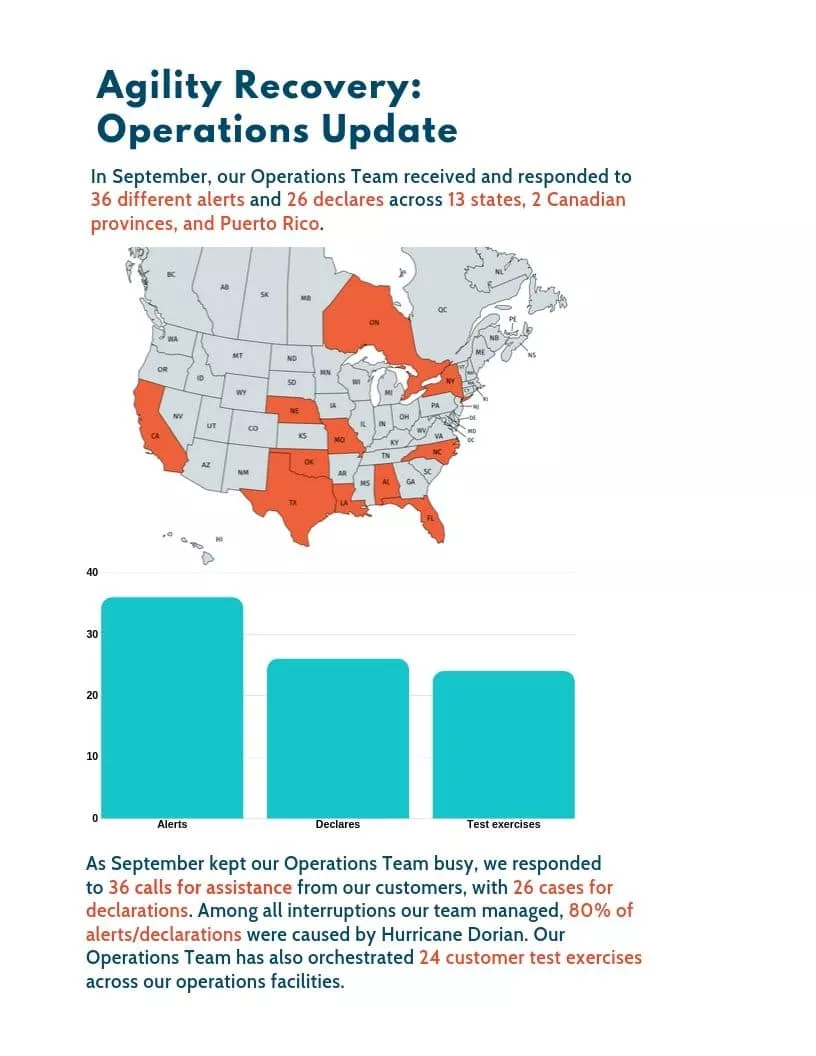
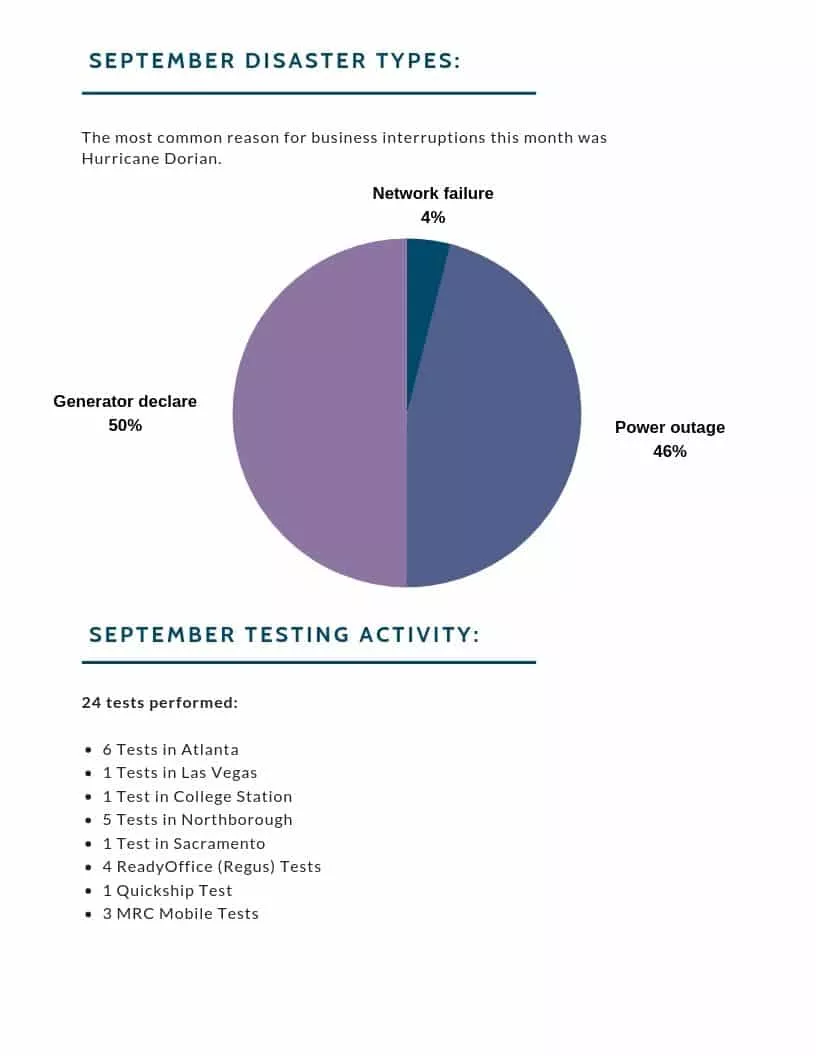
In September, our Operations Team received and responded to 36 different alerts . Matching the unexpected with our exceptional service delivery, our response team helped businesses across 13 states, 2 Canadian provinces, and Puerto Rico to avoid downtime and continue serving their communities. Among all interruptions our team managed, 80% of them were caused by a storm . In addition, the Operations Team also orchestrated 24 customer test exercises across our operations facilities. Here are some of the successful recoveries we’ve completed in September:
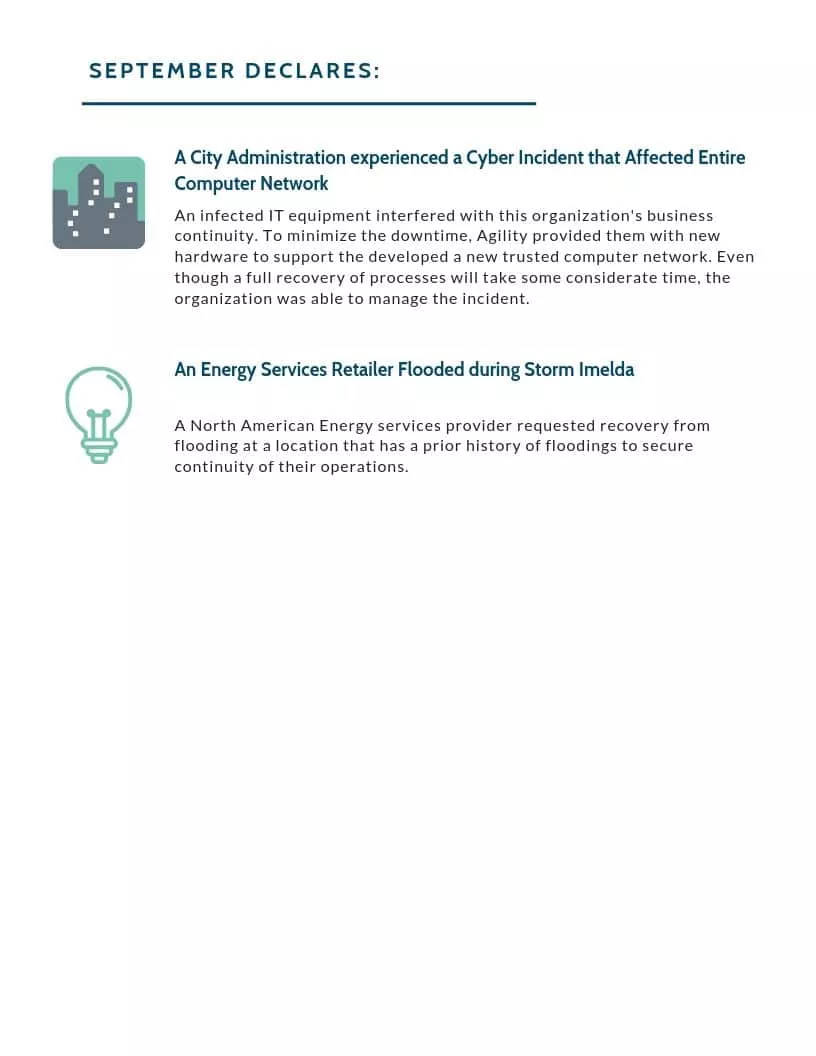
- City Administration Experienced a Cyber Incident that Affected Entire Computer Network Infected IT equipment interfered with this organization’s business continuity. To minimize the downtime, Agility provided new hardware to support their existing computer network. Even though a full process recovery will take some considerable time, the organization was able to successfully manage the incident with Agility’s support.
- An Energy Services Retailer Flooded during Storm Imelda A North American Energy services provider requested recovery from flooding at a location that has a prior history of floodings to secure continuity of their operations.
We invite you to learn more about what we do or connect with us to chat about how we can help your business avoid any interruptions.