

The internet and network connectivity might be a mainstay of daily life, but that does not mean it is entirely foolproof. More and more businesses realize that business disruption due to network and connectivity issues can get in the way of their day-to-day operations. If your organization relies heavily on the phone, internet, and data storage, you need to take steps to safeguard your business network.
Network Connectivity Issues Are More Common Than You Think
Network outages are more than just a brief annoyance. Over the years, several massive disruptions ended up affecting some of the largest corporations in the world. Altogether, network connectivity problems end up costing businesses an enormous amount of time and money.
Nashville AT&T Disaster
An exceptionally high profile case of network issues was the 2020 AT&T outage. Following a Christmas Day bombing in downtown Nashville , AT&T's regional connections facility was severely damaged, bringing local and state wireless communications to a halt . The impact from this disruption will linger for weeks, stressing ATT's single point of failure issue. Such interruption caused significant problems for businesses throughout Tennessee, Kentucky, and Alabama.

The range of damage done was astounding. Buildings in the area employed temporary battery power to keep services intact in the hours following the explosion, but fire and flooding impaired backup power generators to power those batteries. From Georgia to Kentucky, very few organizations were spared from the impact of the explosion: 911 call centers were disrupted, hospitals lost communication. Even the Nashville airport, government offices, and individual cell phone users. Companies reported that they could not do essential tasks like process return items, handle credit card transactions, and connect to customer service. Some businesses, like Walmart, had to switch to in-store, cash-only transactions for the time being. Others, like Dillard's and Logo Brands, chose to close their doors entirely. A major financial planning service, World Financial Group, ended up having to sit team members in a McDonald's parking lot to handle time-sensitive trades.
CenturyLink Outage
When telecommunications company CenturyLink had a nationwide outage in 2018, the consequences were disastrous. This outage managed to completely knock out 911 calls for many cities and halt ATM withdrawals. Companies reported that they could not access records, use Verizon mobile data for essential calls, or even handle lottery drawings. The incident lasted two whole days, and it was so severe it led to an FCC investigation. The investigation revealed that the entire national outage was due to a single network management card issue. Such an incident caused cascading errors that overwhelmed all of CenturyLink's safeguards. Ultimately, one little problem ended up, causing countless businesses to resort to pen-and-paper note keeping, cash-only sales, and delayed client communications.
Google Cloud Downtime
As one of the leading cloud service providers, Google Cloud caused massive disruptions when it went down in 2018. Many tech companies, including Spotify, Discord, Pokemon GO, and Snapchat, found themselves unable to save or access data. In addition to effective data storage, the Google Cloud downtime also affected companies that use cloud networking services to communicate. Google ended up providing affected customers with some credit refunds for the downtime. However, industry experts report that businesses suffered $750,000 in losses during the brief outage . Due to how the company's service agreement works, they did not compensate most of the money.
Cloudflare Goes Down
Called "the most important internet infrastructure company," Cloudflare is an essential service used by countless websites and companies. When it went down on a Saturday afternoon in 2020, the results were immediate and highly problematic. Since Cloudflare is used to handle many digital storefronts, companies like Playstation could not process transactions. Meanwhile, businesses that used products like Discord to communicate were unable to handle calls and messages properly. Typically, Cloudflare relies on automated systems to avoid any network related issues. However, the 2020 outage was so widespread that it overwhelmed these safeguards. The company rushed to provide manual interventions . However, their services were not restored until the next day. During this time, countless businesses, websites, and apps suffered from network issues.
What to Do When Your Communications Network Goes Down
When your connections system goes down, there is no need to panic. However, getting your business up and running again should be a priority.
The Cause of Network Failure
Solving connectivity issues depends on what caused the disruption. Did a storm knock out your building's power? Has your cloud service provider had a significant downtime? Finding why your organization has connectivity issues at work is essential because it helps you work towards a fix.

In some cases, you can address the problem fairly quickly by doing something like flipping on a backup generator. In case of a regional event, like a hurricane or flooding, the demand for a generator is typically higher than its supply. That's why having a business continuity provider that guarantees you timely delivery of a generator can help mitigate any further risks. However, sometimes the network outages may be long-lasting. In these cases, you need to start thinking about alternative ways of dealing with essential business tasks.
Emergency Messaging
If a disaster strikes, a landline phone system won’t be able to distribute the updates, immediately putting your workforce at risk. Reevaluate your communication methods, and if your business doesn't have an emergency notification system, it's time to set up the platform.

The purpose of a message is to reach a person. The best way to ensure delivery is to use as many communication channels as possible: text message, email, voice mail to both cell and home phones. The more options available, the more effective the system will be, and the message will be seen. Having emergency notification procedures in place is critical for multiple reasons. For one, threats like cyber-attacks, terrorist acts, workplace violence, and natural disasters can happen at any time. And they can put your operations and properties at risk. Besides, these types of disasters can cause harm members of the workforce who are working in your building. State, local, and federal regulations also require building owners to create emergency action plans along with life safety plans to keep their tenants, property managers, and visitors safe. With the emergency notification or incident management platform, you can more easily prepare for these disasters. You can also more readily respond to them when they do occur. In the end, you can protect both workers and your property. The right procedures will help you adequately inform tenants and their employees about what to do in a crisis. They will also minimize the impacts of a disaster on a business. Once you have your network up and running again, you need to start thinking about data recovery . Ideally, your workplace should have an automated data backup system in place that makes it easy to restore lost data. However, if your workplace did not plan, you may need to devote more time and energy to recover your essential data.
How to Keep Network Outages from Happening Again
If you want to avoid a lot of hassle and inconvenience, you need to have a dedicated plan for handling communication issues. Preparing in advance can save you time and money when disaster strikes. Having a business continuity strategy is essential for protecting your workforce, operations, and processes. One of the most common sources of business interruptions is power loss. Aside from offering power and generator services, our team at Agility can help your organization set up satellite or LTE connectivity. This can help keep your team connected with local networks go down. To safeguard essential data, make sure you have a data backup system in place. With a reliable appliance-based cloud backup solution, you can protect sensitive data from system problems. Follow this advice to supplement your business continuity strategy and protect your company from network and communication problems. As Agility Recovery members, businesses can keep functioning even when unexpected issues arise.
Since the onset of the pandemic, 91% of businesses have reported an increase in cyberattacks. Surprisingly, plans on following a cybersecurity checklist or how to deploy a cybersecurity strategy haven't been a priority for companies around the globe not so long ago. In 2017, the phrase "ransomware attack" was trending like never before. In recent months there's been a rapid shift to working remotely, which creates more security vulnerabilities than ever before. Perhaps your business has already suffered a few cyberattacks. Even if it hasn't, it's always worth upgrading your cybersecurity awareness and preparedness for the new norm. Just as wearing a mask can help decrease coronavirus transmissions, so taking a few extra precautions helps reduce the impact of cyberattacks on your business. In this article, we'll give you a cybersecurity checklist you should use to safeguard your company and its data.
Educate Employees on Digital Hygiene
Your employees are the first line of defense when it comes to cybersecurity. This is evident when you consider the shockingly high statistic from the introduction. Consider this: 94% of malware is delivered through email, and over 80% of security incidents are phishing attacks. Both of these security breaches are easily avoidable if your employees know what to look for. So the best way to upgrade your cybersecurity for business is to educate your workforce. If you don't already have one, consider hiring a chief security officer (CSO) to provide regular training and education for your business. If your workforce is operating remotely, video conference calls should help you ease the training process. You can run various competency or check-in tests to ensure that your employees understand the value of being prepared for a cyber breach.
Cybersecurity for Video Meetings
On that note, your business has probably seen a dramatic increase in the usage of video meetings or video conferences. Your workplace can take a few steps to make sure that all meetings are as secure as possible. Firstly, always opt for password-protected meetings instead of public ones. Only share the passwords with relevant people and ensure that these login details aren't physically written down anywhere. For example, a hacker could obtain a Zoom meeting password through a selfie on social media where an employee has the password written down on a Post-It that's stuck to their desk. Such an incident happened in November when a Dutch journalist gatecrashed a confidential video conference between EU defense ministers.
Secure Web Browsers
It's almost guaranteed that your employees will need to use web browsers to conduct work and search for personal reasons when off the clock. Most ads served by websites are benign and annoying at most. But others can be filled with malware, and you don't want your employees to take any chances. Make sure both you and your employees use good-quality ad blockers. Having a good antivirus program with endpoint security can help significantly as well.
Patch All Your Systems
Patches are released to plug up any vulnerabilities found in systems. The longer you wait to install these patches, the more at risk your business is for a security breach. It might be tempting to keep postponing patches for weeks at a time since they're inconvenient. But considering that unpatched vulnerabilities cause 33% of breaches , you and your employees must install these as soon as possible. If you have systems that can't be patched, make sure you isolate them. Doing so ensures that if they do become infected, the malware won't spread throughout your network.
Be Diligent in Monitoring Your Systems
Today, there are more sinister threats at play that aren't as obvious, such as zero-day threats. These are essentially vulnerabilities only cybercriminals know about, which means they're able to run rampant with attacks without you knowing or having a solution (otherwise, a patch). A way to fight against zero-day threats is to diligently monitor your systems for any unusual behavior. Once you detect any, you can preemptively block actions before they can even take place.
Perform Penetration Tests
Hackers usually find their way into networks by exploiting exposed ports. For example, once the pandemic started and more people started working at home, attacks on Remote Desktop Protocol (RDP) servers tripled in March and April. To combat this, you need to close any ports that aren't in use. The fewer potential targets cybercriminals have, the lower the chance of them being able to exploit them. In addition, it's good practice to have a robust firewall. Doing so enables you to both monitor and filter port traffic, which can stop hackers in their tracks. It would help if you also ran regular port scans and penetration tests. This ensures that you're vigilant about any vulnerabilities.
Have a Business Continuity Plan
Despite all your best efforts, it may be inevitable that a cyberattack is successful. And all it takes is one for your company to suffer greatly. On average, they cost businesses $200,000 , which causes 60% of victims to go out of business within half a year. Having a business continuity plan in place can save your company's reputation. This plan can help you prepare for the worst, so recovery is swift and as painless as possible. The great thing about a business continuity plan is that it protects against cyberattacks and reduces downtime caused by natural disasters. Implementing a business continuity strategy ensures that you're covered from all angles so that no matter what happens, you can get up and running again in no time, with as little data loss as possible.
Use This Cybersecurity Checklist as a Starting Point
With this article, you'll have a great start when it comes to a cybersecurity checklist for the new norm. However, this isn't a comprehensive list at all. If you'd like to maximize your company's cybersecurity in COVID-19 times, then make sure you download our cybersecurity checklist . This will provide you with even more guidance on safeguarding your data from bad actors. Would you like more assistance? Then get in touch with us today. We'll be ready to help you get peace of mind.
Establishing proper cybersecurity policies and protecting your business and its promise is every leader’s priority, along with ensuring the wellbeing of the people. The number of disruptions affecting businesses is rising, with cyber risks having an upward trend. The COVID-19 pandemic has had an enormous impact on how many organizations do business, with many people working from home and increased demand for video conferencing, cloud applications, and network resources. The speed, connectivity, and wide range of benefits make the cyber world a must for any business; however, as the cyber community develops, so do the risks of working with today’s technology. That being the case, it’s essential to make sure you know the latest trends, risks, and threats to your cyber safety heading into 2021. This article will fill you in on everything you need to know to stay informed and stay ahead of the cyber game to keep your company protected for a long time to come. Read on to find out more!
Why Real Leaders Are More Resilient About Cybersecurity Trends & Threats
Today’s leaders are doing that and making sure they stay ahead of the curb. In fact, the statistical analysis demonstrated that leaders were described as the highest performers in stopping more attacks, finding and fixing breaches faster, along with reducing breach impact. Cyber resilience occurs when a business successfully brings together the essence of cybersecurity, business continuity, and enterprise resilience. With this trifecta applied, companies can quickly and easily apply fluid security strategies to respond to any threat, reducing the damage of an attack to a minimum – if anything at all. Business leaders who follow this trend stand by three main objectives:
1. They make sure they invest in their company for operational speed;
2. They drive value from new general and cyber-specific investments;
3. They make sure to sustain what they have.
As a result of following these objectives, these leaders can produce a cyber-resilient business that can safely introduce their latest innovations and business models securely, strengthen the level of trust with their customers, and grow their business with confidence. This is obviously of incredible importance for any business, especially one that is scaling in size or is already a powerhouse in their industry. It’s no surprise this is the case; after all, bigger companies are also bigger targets, and the more experienced hackers and cyber evildoers are bound to try their hand at taking down the system. That said, a cyber attack can (and often do) happen on small businesses precisely because they’re small and, therefore, more likely to lack the necessary security features. No matter the size, every business has to have a business continuity plan that covers both physical and virtual components of disaster recovery.
The Cost of a Data Breach and Threats to Look Out for
The number of potential business threats is incredibly high and equally as complex. Studies show that about one-third of data breach costs occurred more than one year after a data breach incident, extending a life-cycle of a data breach. Over the last couple of years, the global average total cost of a data breach increased to $3.92 million. Interestingly, organizations subject to more rigorous regulatory requirements, such as healthcare, financial services, and energy, had a higher cost of a data breach experienced an average total cost of a data breach significantly higher than less regulated industries. Even though one of the top three root causes of a data breach or a cyberattack is a human error, there are specific threats business leaders need to be on the lookout for based on a business’s size and industry type. A few of the more notorious ones are listed below.
Current Data Breach Trends
- Data breaches may take longer to identify and contain due to remote work.
- Remote work is expected to increase the cost of a potential data breach.
- More mega breaches (more than 1 million records exposed) are expected to happen in the coming years.
Ransomware Attacks Have Skyrocketed
Ransomware attacks have been around for a long time, and COVID-19 has caused the use of such malware to grow exponentially due to everyone being short on finances. This is also a malware that doesn’t seem to be going anywhere anytime soon, so you need to be prepared to see it in 2021 and in the years afterward. Ransomware is a type of malware primarily used to target banks. It holds the bank for ransom (hence the name), threatening to steal and leak important company data unless that bank is willing to pay a specific amount in their own funds. Of course, with most of these banks prioritizing company data secrets over replaceable dollars, the ransomware is generally quite effective when used. Furthermore, it’s especially dangerous to small banks or subsidiaries that have been recently acquired by larger banks which seem to be the main target of ransomware makers. If your business is in the financial industry, you’ll want to be careful and plan well ahead to fight against this enemy.
Cryptocurrency Is at Risk
Cryptocurrency has grown to become the hottest thing in the financial industry. Everyone wants a piece of the crypto-action – including, unfortunately, cyber thieves on the prowl for a quick and healthy snatch. Despite the secure sounding name, cryptocurrency isn’t as secure as we would like it to be. This has shown itself to be true in past years, where there was a surge of attacks on Bitcoin and other alternative cryptocurrencies in 2018. Worst still, we don’t actually know if the cryptocurrency’s latest cybersecurity features can stand up to the latest in malware.
Healthcare Devices Are the Next Target
The healthcare industry may not seem like one that would be a target for malware users and hackers. After all, what would they possibly gain by attacking the health sector? The answers may be numerous and varied, but the facts state that each year the industry experiences more sophisticated attacks and the numbers show no signs of stopping. With healthcare’s growing dependency on new technology, a growing pool of medical records and private information is present on the dark web. The influence of implanted devices and other medical wearers are starting to become points of entry for the hackers to directly connect with and cause harm to a patient. Make sure to take extreme caution when handling your in-patient or their private documents.
5G Isn’t So Safe
We’ve been anxiously awaiting the arrival of 5G. After all the only thing better than the internet is faster internet. That being said, our speed may very well come at a cost. Our current 5G internet runs on short waves to send and receive tower transmissions, which also means more towers will need to be placed in close proximity to each other. Clowser towers may allow evildoers to more easily track where you are, putting your business on the bad guy’s map. Moreover, the interconnectedness of 5G will allow service providers to have an unprecedented amount of excess to large data sent by user devices. This data could help the hackers to know more about what you do through the information picked up by the servers, allowing them to glean into your life and cause harm whenever they can.
What Your Business Can Do About It
Even though cyberthreats are best left to the pros, you don’t have to rely solely on the IT department to handle all of your problems. Certain factors can mitigate the cost of a cyber attack or a data breach. Among the action management should take are: a. Invest in incident response testing b. Have a dedicated business continuity management specialist c. Build an emergency response team d. Support and promote employee education and training Combining an incident response team with an emergency plan testing and employee education can greatly reduce the cost of a data breach. However, a comprehensive business continuity strategy should be the target for your organization if it plans on being in business for many years to come.
Our monthly report on the number and types of business interruptions we have responded to and companies we have recovered, providing our unparalleled business continuity and disaster recovery solutions. DOWNLOAD REPORT
Synopsis
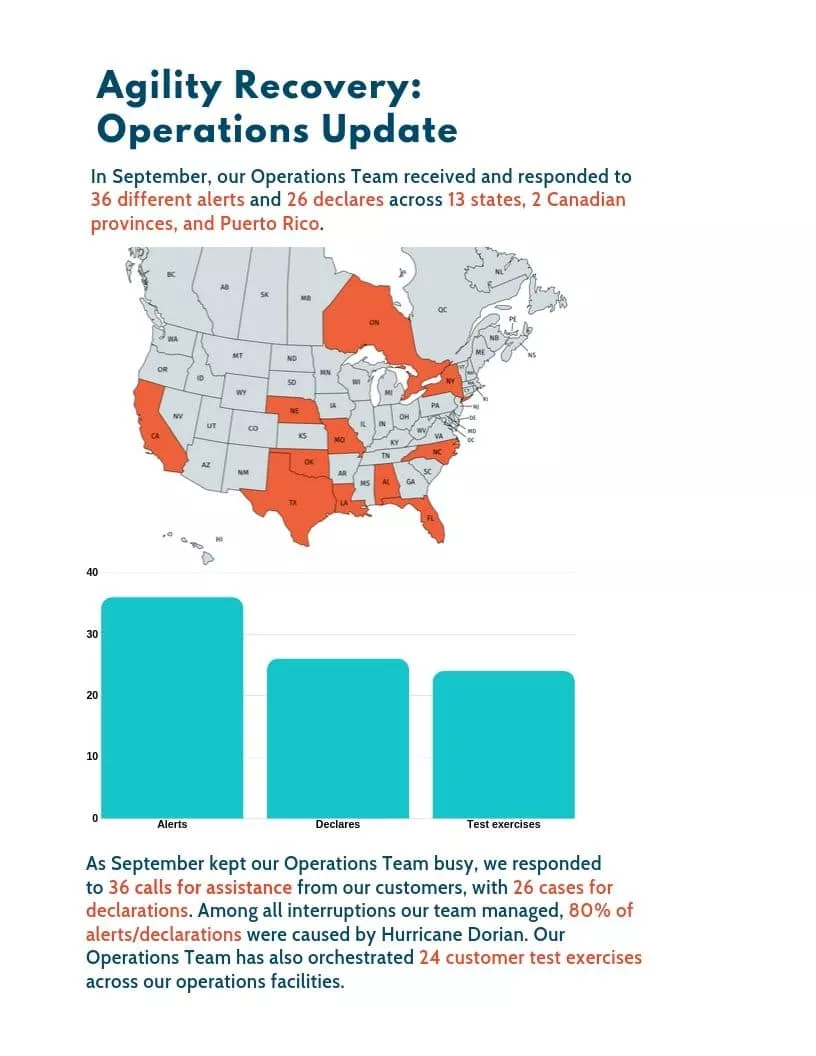
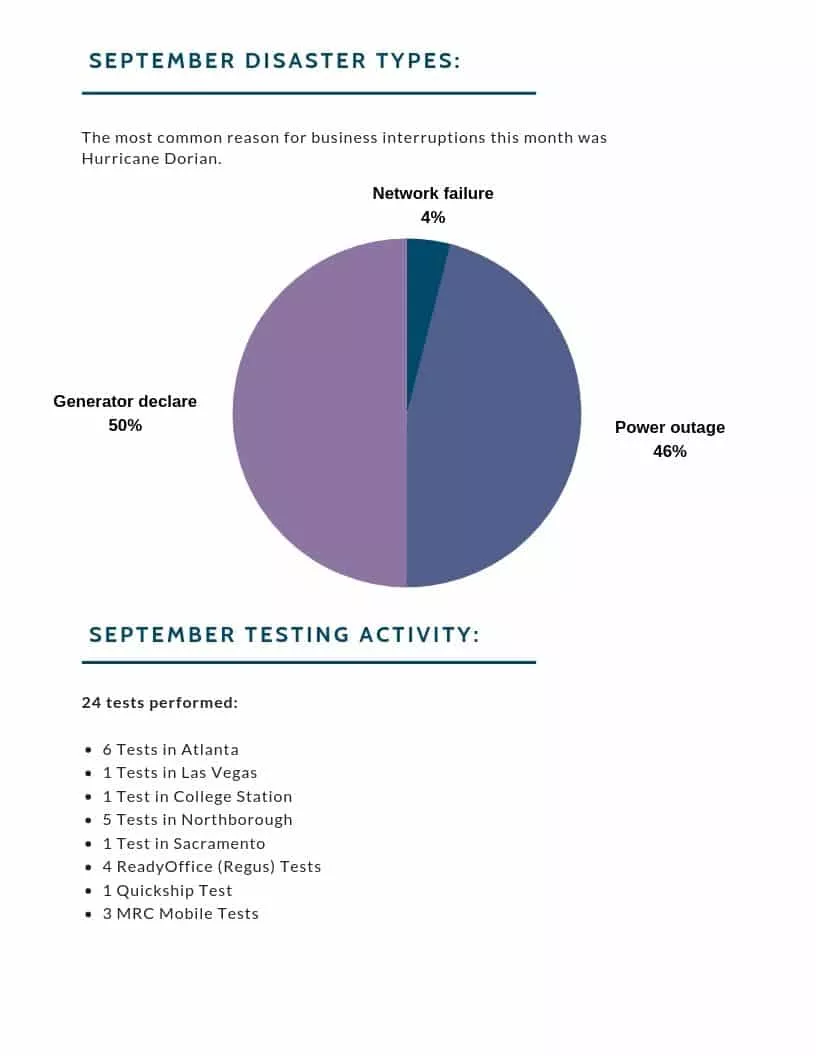
In September, our Operations Team received and responded to 36 different alerts . Matching the unexpected with our exceptional service delivery, our response team helped businesses across 13 states, 2 Canadian provinces, and Puerto Rico to avoid downtime and continue serving their communities. Among all interruptions our team managed, 80% of them were caused by a storm . In addition, the Operations Team also orchestrated 24 customer test exercises across our operations facilities. Here are some of the successful recoveries we’ve completed in September:
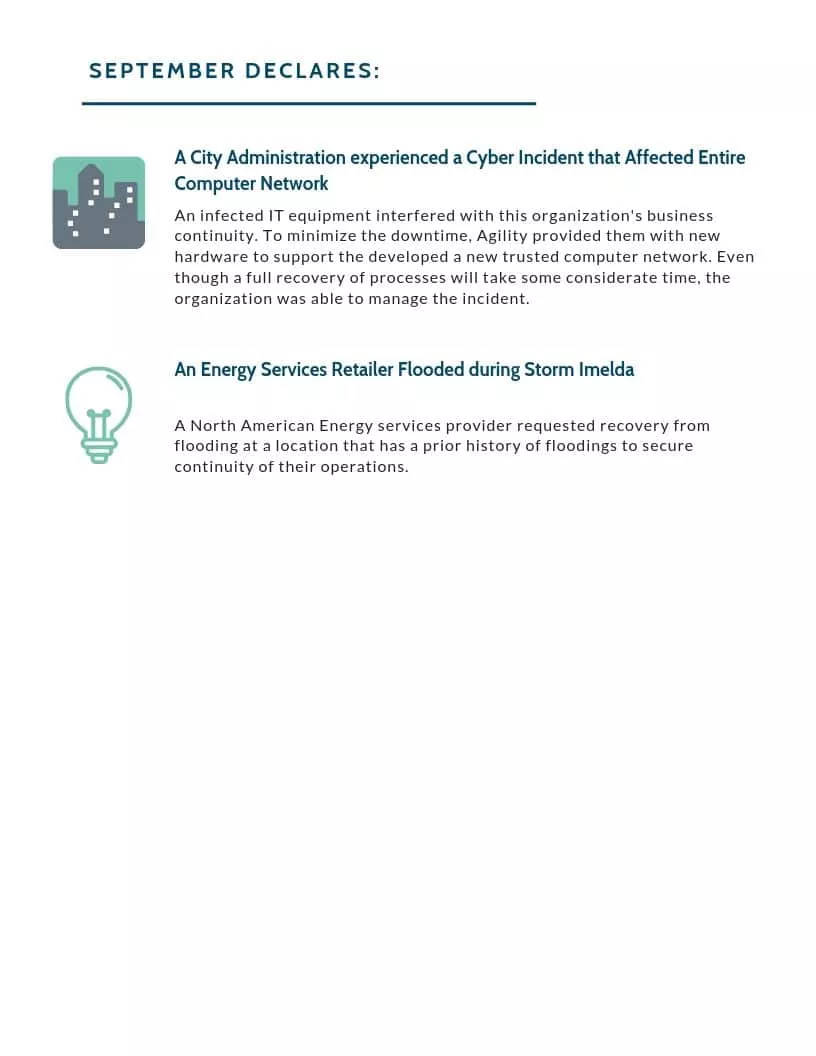
- City Administration Experienced a Cyber Incident that Affected Entire Computer Network Infected IT equipment interfered with this organization’s business continuity. To minimize the downtime, Agility provided new hardware to support their existing computer network. Even though a full process recovery will take some considerable time, the organization was able to successfully manage the incident with Agility’s support.
- An Energy Services Retailer Flooded during Storm Imelda A North American Energy services provider requested recovery from flooding at a location that has a prior history of floodings to secure continuity of their operations.
We invite you to learn more about what we do or connect with us to chat about how we can help your business avoid any interruptions.
As a technology-dependent society, we out to learn from cybersecurity lessons from the past major cyberattacks to protect not only our assets but also our clients’ private information from any data breaches. On May 12th, 2017, the WannaCry ransomware attack was an international buzzword. Beginning in Europe, the malware quickly took over the globe, demanding users’ money for return of seized data. Using information stolen from the U.S. National Security Agency (NSA), hackers attacked more than 200,000 machines worldwide, affecting different industries and businesses of all sizes. Just a few weeks later, a new cyberattack emerged, hitting companies’ data worldwide, totally wiping it from hard drives. So how come after one major cyberattack of the year, some companies were still unprepared for what NotPetya had to bring? Let’s take a look at the cybersecurity lessons learned from major cyberattacks after myriad companies failed at protecting their assets.
An In-Depth Defense
An attack can come from anywhere, anytime. That’s why implementing extensive and multi-layered security measures to protect the organization’s critical data, ranging from customer data to private internal files, is a top priority for any business. Exercising incident response plans is an effective practice that can bridge the gap between companies’ policies and practices. However, the only way to make sure practices match the intent of cybersecurity policies is for businesses to conduct regular staff training and test exercises, such as tabletop tests . Doing so will enable operational staff to get familiar with the incident response process .
Timely and Accurate Communication
Communication isn’t always about handling the media when the attack goes public. In the event of a cyber attack, keeping everyone involved on the same page is integral to a company’s reputation. Addressing such an incident internally early can and will help mitigate the effects of it and properly translate an incident into what actually needs to be done. A cyber incident response team must run an investigation to understand what part of information got compromised and to what extent did that affect the clients. Managing the crisis at hand and getting the facts right is the foundation of the ethics of communication. Most companies that have been affected by a data breach agree: proper digital housekeeping can provide a lifeline during a cyber incident.
Proper Digital Housekeeping
Experts stress the fact that the database entry logs play an important role in investigating a cyber incident. Good data housekeeping can improve cyber incident response. Even though it’s so impactful, not all cybersecurity responders get it handed to them once the need arises. There are many organizations that neglect to update their logs and transfer them to an appropriate person, which will definitely interfere with an investigation.
Securing a Service Level Agreement (SLA)
For an effective response, having the right contract in place will allow timely access with SLAs to the information a company needs in the event of a cyber attack. If your vendor is withholding some critical data, you must have a contractual means to fall back. Establishing SLA in advance will be your agreement with your provider, either external or internal, that outlines the services to be provided, the expected responsiveness, and performance measurement.
Hurricane season officially starts on Saturday, June 1, and is expected to get more intense later in the summer when things heat up. NOAA defines June 1-Nov. 30 as the timeframe for the hurricane season because it includes more than 97 percent of tropical cyclones. However, there’s a reason that 3 percent exists. Subtropical storm Andrea made a brief appearance to the southwest of Bermuda on May 20.

Based on NOAA’s outlook, it’ll be a near-normal Atlantic hurricane season with a 40% chance of a near-normal season, a 30% chance of an above-normal season, and a 30% chance of a below-normal season.
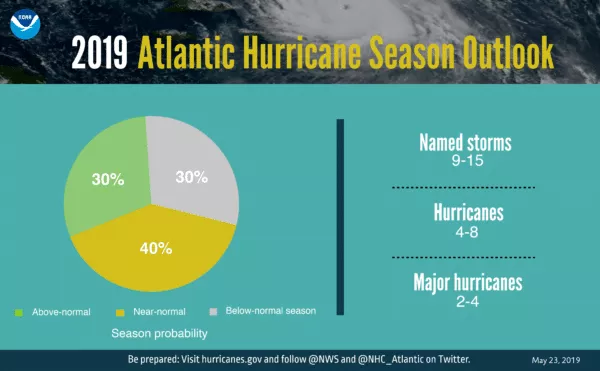
It’s with a 70% confidence that NOAA ranges named storm from nine to 15 with winds of 39 mph or higher. Four to eight of these storms could grow into hurricanes with winds of 74 mph or higher, and two to four major hurricanes.
Create a Plan That Addresses the Entire Business
There’s a common misconception that business continuity planning only affects the IT department. In fact, whether you create a business continuity plan (BCP) internally or choose to outsource it, your BCP should involve strategies for getting critical processes and departments up and running again. If you already have a BCP in place, third-party consultants can provide an objective view of your business and make suggestions for your BCP so that your plan is effective when interruptions occur. Business continuity as a service (BCaaS) uses the expertise of professionals to develop and manage a specific plan tailored to your business’ needs. With a streamlined course of action, your business will be able to remain operational in the event of a disaster.
Prepare Alternate Workspaces
Whether there’s physical destruction to your building or employees and customers are unable to travel, damages from disasters can hinder your ability to maintain normal business activities in your primary office space. If you need to relocate business operations , make sure you have access to an alternate workspace as soon as possible. Fully equipped alternative workspaces like Mobile Recovery Centers (MRCs) can be made available within as little as 24-48 hours of a disaster declaration, while Fixed-site Business Recovery Centers (BRCs) can be made available within as little as four hours of a declaration. Once the alternate location is set up, your company can begin to restore business operations successfully.
Back up and Recover Your Data
Having access to your data and applications is imperative when disaster strikes. A fully managed and monitored cloud recovery platform will protect your IT infrastructure. With secure data vaulting and recovery , your data will be recoverable on- or off-site within your recovery time objectives.
Experts are suggesting that the new technology is bound to leave people with no warning and time to evacuate.
Technology has mainly been deemed integral to progress. But what if decades of advancements in weather forecasting were retracted, and we wouldn’t be given any time to prepare for an approaching catastrophic storm? This scenario may just be a real one. Government’s science agencies believe it could happen due to a current race to deploy a 5G technology that promises higher speed for mobile networks. The leaders of NASA and NOAA warn that deployment of 5G networks can negatively impact the transmission of critical data, threatening the interests of science and national safety. Federal Communications Commission (FCC) seems to be on polar stands with the National Telecommunications and Information Administration (NTIA), NASA, and NOAA. The dispute regards wavelength frequencies currently used by public and private weather satellites, weather balloons, and ocean buoys to predict the weather. Raising many concerns with meteorologists, the debate is intensified by the nearing WRC conference that convenes nations every three years to revisit international regulations on radio spectrum usage.

Experts are worried about losing potential access to specific portions of the electromagnetic spectrum meteorologists rely on for Earth observation. The infamous 5G technology is planned to use the spectral bands and the adjacent bands. And if the wireless technology moves into the said bands, there’s a risk of interference. Passive microwave sensors pick up a feeble signal that could easily be drowned out by transmission in an adjacent band. Without accessing microwave sensor data, it would be impossible for forecasters to have predicted the path of Hurricane Sandy, which struck the Eastern seaboard in 2012, claims Jordan Gerth , a researcher at the University of Wisconsin’s Cooperative Institute for Meteorological Satellite Studies. The heated argument involving Mr. Gerth and CTIA, the trade group representing the U.S. wireless comms industry, was taken to Twitter. Previously, CTIA called the microwave sensor as “ fake ”, and that it “ never went into use .”
“The dire predictions about the impact of #5G on current weather forecasting are wrong on the merits, on the facts, and on the process.” -EVP Brad Gillen on how we can—and will—have 5G and weather forecasting. Read more: https://ctia.it/2MdJlur
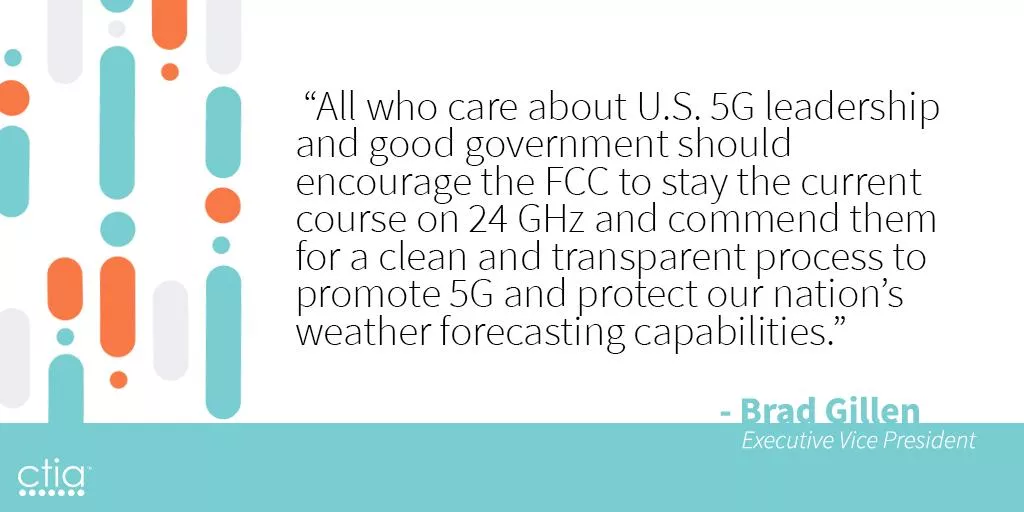
In response to that, Gerth tweeted that CTIA’s blog post is “misleading.” He specified that the canceled sensor was replaced by a similar model used by NOAA and other international agencies. It appears the parties involved in the conflict remain on the opposite sides of the spectrum. Mark Norton, Agility’s Test and Declare Manager expressed his hope, saying, “The Sounding of the alarm is out of the abundance of caution, but it certainly seems to carry merit.”
As we rely on technology more and more, exposure of companies’ intangible yet precious assets is increasing due to a growing number of data breaches and relentless ransomware attacks. Frequently, cyber incidents bring their own BI losses. Companies rank cyber as the BI disrupter they fear the most because many companies’ principal assets are data, service platforms, or groups of customers or suppliers. Cyber incidents can prompt widespread losses.
$3.86 Million is an average cost of a data breach*Cost of data breach report, IBM & Ponemon Institute, 2018
Although cybercrime steals the media spotlight, often it is more ordinary technical malfunctions, IT flaws, or a human error that stand behind system outages or data losses for businesses. An employee’s mere mishap can lead to a costly fall-out.
58% of organizations publicly exposed at least one cloud storage service*Cloud Security Trends, RedLock, 2018
However, even with such high numbers being reported, a business can’t account for every single dollar spent to recuperate from disruption, so the losses can be a lot more profound.
Analysis of Data Breaches
- – System Glitch
- – Human Error
- – Malicious or Criminal Attack
It’s in every company’s interest to adopt an adequate IT security position, evaluate its processes and risk profile, and invest in proper backup solutions and staff training. The last element is frequently overlooked, yet it’s equally significant, especially for small- and mid-sized companies. Businesses need to think about all of their employees as members of the cybersecurity team and train them to become the first line of defense. Loss of revenues and additional costs can come from malicious acts, but the overwhelming majority happen because of technical glitches or a human error.
“What will we do if our primary facility is inaccessible? Easy. Our employees will work from home.” We hear this a lot. If your primary facility isn’t available, it makes sense to have employees work from home. Thanks to the cloud, a work-from-home (WFH) alternate workspace strategy is cheaper and more doable than ever before. But what happens when your entire workforce needs to work from home? It sounds extreme, but we’ve seen it happen. Before writing off alternate facilities, think about how a WFH strategy would work for your entire business (or branch). Here are the top issues to consider.
Business Processes
For WFH to go smoothly, you must design business processes to accommodate remote work. The three principles of a successful WFH strategy are:
- – Communication
- – Coordination
- – Culture
During a business interruption , all departments must be able to communicate and solve unforeseen business challenges. Is WFH currently a strong part of your business culture? If not, trying to adapt to a remote workflow in the middle of a crisis will not go over well. Don’t forget about factors that might complicate WFH arrangements, such as supply chain interruptions or seasonal demands.
Plan to have employees work from home during an interruption? Consider how you’ll address these factors:
- – Functions or departments that involve high levels of in-person collaboration.
- – Precautions for handling sensitive data.
- – Supply chain interruptions.
- – Season demands.
Clearing these obstacles with many employees working remotely could be tricky, especially if there are connectivity issues. This brings us to our next point.
Connectivity
No matter where they work, employees need to have access to the resources they need to do their jobs: voice and data communications, power, phones, computers, etc. After major “perfect storms” (which are becoming the new normal ), cell phone, power, and internet connectivity might not be available. For example, after Hurricane Harvey hit Rockport, Corpus Christi and Port Aransas in Texas, wind damage knocked out power and communications. WFH wasn’t even an option for businesses in those areas. In Houston, WFH seemed to be an ideal strategy. Countless roads closed, floodwaters lingered for days, and offices were destroyed. Although the city experienced record levels of flooding, the communications and power infrastructure proved resilient. For many companies, it just made sense to have employees work remotely. But many businesses hadn’t thought through the logistics of the entire company working remotely. The sudden influx of remote employees taxed company resources: VPN licenses, bandwidth availability of VPN concentrators at the home office, etc. How would you handle your entire business working remotely? Think about how you’d respond to the following potential issues:
- – Employees might not have the right equipment, whether because they weren’t issued company-approved hardware in time or because it’s trapped inside the home office.
- – Internet connectivity in employees’ homes isn’t always reliable.
- – A significant increase in remote workers can overload the VPN.
- – Employees not used to working from home might have trouble logging in.
- – Company phone systems might not be compatible with employees’ personal devices.
- – Vulnerable network connections increase the risk of sensitive data exposure.
- – Employees are more likely to use personal devices without appropriate security settings.
The higher your ability to address potential connectivity challenges , the more likely WFH is to succeed. But that’s only one part of the equation.
Employee Needs
Some employees thrive on the solitude and familiarity of working from home. For others, it’s simply not a good fit. Maybe they’re too easily distracted by the piles of laundry that need to be folded, a loose doorknob that needs to be fixed or kids popping in to say hi every five minutes. In the aftermath of a catastrophic event, employees might not have much of a home to work from. After Harvey, for example, many of our clients in Houston had employees whose homes had been flooded. Imagine juggling your job and your search for a reasonable contractor, all while sitting in a room with no drywall and damp, exposed subfloor. Employees may not want to work from home in these scenarios. After Hurricane Katrina, employees of one of our bank customers were thankful to have an air-conditioned Mobile Recovery Center to work from because it still had air conditioning, and many of their homes did not. You might have solid remote working processes in place and a plan for connectivity issues, but if the work ethic isn’t there, WFH isn’t going to, well, work. Make sure you consider the human side of business continuity and identify your employees’ needs ahead of time.
Duration
If employees aren’t a good fit for WFH or if business functions are better suited for in-person interaction, how long can you sustain remote working arrangements? Of our clients who had employees working from home following Harvey, they reported that WFH worked well for about a week. After that, internal processes began breaking down. Consider all the factors we discussed above and the possibility that WFH might not be the only strategy you’ll have to implement. If your facility is inaccessible for a period of time that exceeds your ideal time frame for WFH, have a plan to transition to an alternative facility. To be clear, WFH isn’t a bad strategy across the board. It’s just not always as simple as it seems, and it shouldn’t be the only alternate workspace strategy.
JUNE OPERATIONS REPORT ON BUSINESS INTERRUPTIONS
In June, we deployed resources to three of our customers experiencing business interruptions. Seven additional customers placed us on standby after potential disruptions to critical business operations. Our teams faced a few planned interruptions, some weather related events, and even a bat infestation. There’s never a dull moment when it comes to supporting our customers and delivering on our promise. It truly isn’t a question of IF, but WHEN. – Agility CIO, Operations We also supported 12 ongoing customer recoveries and facilitated 30 customer test exercises throughout the month.
Our Team Performed Three Physical Recoveries
-
Training Class Needs Laptops
When this state government organization has a new training class, they need temporary laptops. They use our QuickShip technology service to smoothly run training operations without the cost of owning, maintaining, and replacing extra IT equipment. When they called us in June, we immediately shipped them 15 laptops with their computer image already loaded. Because we do not charge our customers a usage fee for our technology hardware, they paid only the shipping costs. -
Retailer Loses Power
This national retailer received notice about 3 days in advance of some nearby utility work that would cause a 7-day outage to their location in Torrance, CA. The store could not afford to close and did not want to force hourly wage workers to forgo a week’s paycheck. They called our operations team to request an on-site generator to power the store and remain open with no disruption. Our team deployed a 300kW generator the evening prior to the planned outage, ensured proper connection, and scheduled multiple fuel drops throughout the event. -
Insurance Firm Confronts Internet Loss
Our Fort Worth customer was in the process of moving offices when they learned they could not have internet service in the new building for two weeks. As with many commercial construction projects, there are inevitable delays. The firm needed connectivity to perform all of their critical business functions, especially their core service: verifying insurance coverage for commercial entities doing business together. A two-week interruption would have been catastrophic to their bottom line and their customers’ business processes. Their operations manager called our hotline and explained their needs. Our operations team shipped a switch and two LTE Cradlepoint devices the same day. They used the devices until their local internet was connected, saving their reputation and revenue.
We Saw These Other Unexpected Events
-
Colony of Bats Makes New Home in Insurance Agency
This local affiliate of an independent insurance agency recently discovered a bat infestation in their offices. Because bats create waste that causes contamination and disease, local authorities condemned the building until remediation could take place. -
Rain Floods Credit Union
This regional credit union in southwestern Texas near the Rio Grande River Valley operates 13 branch offices and serves more than 45,000 members. Following the largest rainstorm in the area in 15 years, their Mission, Texas location was forced to close its doors.The water damage to this location caused our customer to close and redirect members to an alternate branch nearby.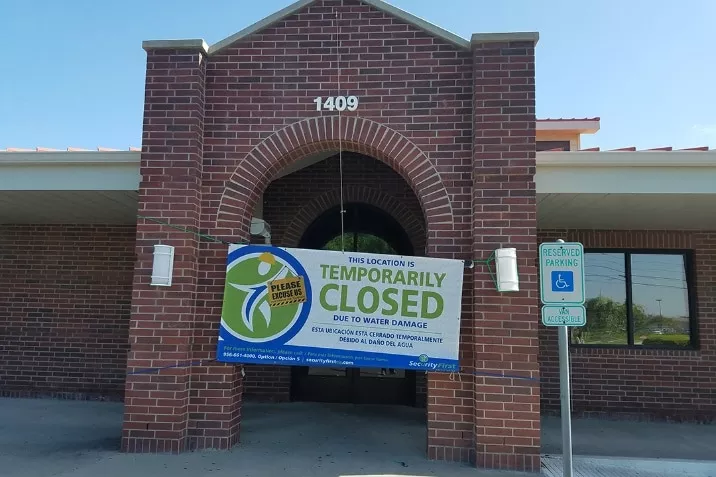
-
Water Shut Off at Insurance Firm
This Toronto non-profit covers dental providers with insurance and investment services. A massive water main break nearby left them with no water service, forcing them to consider shuttering the office of over 70 employees. Without water, no bathroom facilities would function properly. -
Online Retailer Loses Power
This customer learned a critical lesson about the importance of planning during a power outage at their Seattle, Washington location. A local distribution facility for this global online retailer experienced multiple rolling brown and blackouts forcing them to halt operations. This facility housed large refrigeration units to allow for fresh food delivery in local markets. Unfortunately, this location wasn’t covered under our services and they had not submitted their specifications for temporary generator power. Luckily local power was restored in time to prevent any loss of inventory, but on-site leadership made sure to request coverage by us and completed their generator requirements worksheet for the next time temporary power is needed.
Additional Notable Alerts
- Large Investment Firm – Warrendale, PA – Alert for replacement technology due to water damage caused by power fluctuations
- National Retailer – Wilkes-Barre, PA – Alert for temporary power due to nearby tornado damage
- Regional Credit Union – Perry Point, MD – Alert for mobile bank branch recovery due to a vehicle vs. building accident
Ongoing Business Recoveries from Prior Months
We also supported 12 other ongoing recoveries during the month of June including the following:
- Regional Bank – Billings, MT – ReadyFinancial mobile bank branch to a building fire
- Regional Credit Union – Dudley, MA – Planned relocation due to branch renovation
- Regional Bank – Elberton, GA – Planned relocation due to branch renovation
- Medical Equipment Supplier – Jacksonville, FL – Site-to-site VPN Cradlepoint device due to ISP outage
- Global Logistics Firm – Atlanta, GA – Communications recovery due to an office relocation
- Global Online Retailer – Seattle, WA – Temporary restrooms due to increased staffing
- Private Country Club – Clifton, NJ – Planned relocation due to facility renovation
- Local Credit Union – Gadsden, AL – Planned recovery due to new employee training
- Regional Credit Union – St. Petersburg, FL – Planned recovery due to new branch construction
- Regional Bank – Houston, TX – Planned long-term relocation due to closure of an existing location
- Small Municipality – Cavendish, VT – Office space recovery due to a building fire at a garage facility
- Small Municipality – Lafayette, OR – ReadySuite mobile recovery due to a building fire at one of their utility plant locations