
Each year since 2004, October has been designated by Congress as Cybersecurity Awareness Month, a time to educate individuals and businesses alike in protecting themselves online.
According to organizers the Cybersecurity and Infrastructure Security Agency (CISA) and the National Cybersecurity Alliance (NCA) are partnering on this year’s campaign theme — "Secure Our World" — to create resources and messaging for organizations to use when they talk with their employees, customers, and memberships about staying safe online. They list four key action steps everyone should take:
- – Enable multi-factor authentication
- – Use a strong password
- – Recognize and report phishing
- – Update your software
To aid you in improving your organization's cyber-hygiene during Cybersecurity Awareness Month and beyond, we put together some of our top resources below.
Cybersecurity Blogs
- Cybersecurity as a Major Threat to Business Continuity
- Five Ways to Thwart a Cybersecurity Nightmare
- How to Deploy a Cybersecurity Strategy
- Cybersecurity Tips for When You’re Working from Home
- Three Steps to Integrating Cybersecurity with Business Continuity
- Reduce the Impact of Ransomware Attacks with Business Continuity Planning
Cybersecurity Resources
In our increasingly interconnected world, access to high-speed internet is no longer a luxury but a necessity. While urban areas have long enjoyed the benefits of robust internet connectivity, rural homes and businesses often find themselves on the wrong side of the digital divide. Fortunately, innovations in satellite technology are changing the game, with Low Earth Orbit (LEO) satellites emerging as a game-changer in bridging this divide. In this article, we’ll explore the differences between LEO and Geostationary Orbit (GEO) satellites and delve into how LEO satellites are revolutionizing connectivity in rural areas.
LEO vs. GEO Satellites
GEO satellites , stationed at an altitude of approximately 22,236 miles above the Earth's surface, have been the primary means of providing satellite internet for decades. These satellites remain fixed in one position relative to the Earth, making them ideal for services that require constant coverage, like television broadcasting. However, their distance from the Earth introduces significant latency, limiting their suitability for real-time applications and making them less effective in areas with challenging terrain. On the other hand, LEO satellites orbit at much lower altitudes, typically around 1,200 miles or less above the Earth. Their proximity to our planet drastically reduces latency, making them an excellent choice for high-speed internet access. However, this proximity comes at a price: LEO satellites cannot provide continuous coverage over a specific area, as they orbit the Earth in a matter of minutes, necessitating a large constellation of satellites working together.
The LEO Satellite Revolution
LEO satellite technology has made significant strides in recent years, primarily driven by companies like SpaceX's Starlink, Amazon's Project Kuiper, and OneWeb. These ventures have been deploying thousands of LEO satellites into orbit, forming expansive constellations that work in concert to deliver internet services to even the most remote corners of the Earth. One of the most remarkable advantages of LEO satellites is their agility. By constantly orbiting the Earth, they can adapt to changes in demand and traffic patterns, providing targeted coverage where it's needed most. This adaptability ensures a consistent and reliable internet connection for rural homes and businesses , even in areas with challenging terrain, like mountains or valleys. Moreover, LEO satellites employ advanced technology, such as beamforming and phased-array antennas, to deliver faster and more stable connections. This technology allows for intelligent bandwidth allocation, reducing congestion during peak usage hours and ensuring that rural users enjoy the same level of service as their urban counterparts.
Closing the Connectivity Gap
The impact of LEO satellite technology on rural areas is nothing short of transformative. Previously underserved communities now have access to high-speed internet that can support online education, telemedicine, e-commerce, and more. This newfound connectivity has the potential to revitalize rural economies, attract new businesses, and improve residents' overall quality of life. The battle between LEO and GEO satellite technology is reshaping how we connect to the internet. While GEO satellites have served us well, LEO satellites are leading the charge in closing the connectivity gap, particularly in rural areas. With their low latency, adaptability, and advanced technology, LEO satellites are not just changing the game; they're leveling the playing field, ensuring that everyone, regardless of their geographic location, can participate in the digital age. As LEO satellite constellations continue to expand and evolve, the future looks brighter than ever for rural homes and businesses seeking to stay connected.
Though rural bank and credit union branches typically serve comparatively smaller communities than their metropolitan counterparts, remote and rural communities tend to rely on their local brick-and-mortar branches much more than city dwellers – making prompt recovery from an interruption that much more critical for those locations.
Physical branch recovery innovations like mobile recovery branches , quick-ship equipment , and rapid data recovery allow a branch to quickly restore most critical operations with relative ease. Still, broadband limitations in rural areas continue to present challenges for branches dependent on satellite connectivity.
Old Challenges
The Federal Communications Commission (FCC) establishes broadband minimum benchmark speeds for communications providers to ensure every community has adequate access to internet connectivity. Currently, the FCC standard is 25 megabits per second (Mbps) for downloading and 3 Mbps for uploading. Unfortunately, those speeds are far too slow to meet most small businesses’ needs. To address this issue, in July 2022, the FCC proposed increasing the benchmark to 100 Mbps for download and 20 Mbps for upload. This significant increase is still less than a professional office with at least 20 employees online would require for typical use, meaning many businesses and financial institutions in rural communities may still struggle to access the broadband connectivity they need to maintain critical operations.
How Connectivity Loss and Subpar Mbps Speeds Threaten Branch Resilience
- – Inability to access and execute incident response plans, impeding both physical and remote branch recovery
- – Compromises remote control and access capabilities
- – Increases vulnerability to cyberattacks
- – Inability to provide secured service to customers and members; loss of digital banking mechanisms, including ATMs
New Solutions
Technology has answered the call as the need for faster connectivity has increased. Smaller, more efficient satellites offer speeds up to 350 Mbps (and up to 40 Mbps latency) and are becoming increasingly accessible to businesses everywhere, including those in rural communities. Most impressive, though, is that some of these faster satellite solutions offer substantially easier setup and use. While traditional satellites require a certified technician and a lengthy on-site installation process, modern broadband recovery solutions can be shipped directly to a branch and set up in minutes without any previous experience or expertise required. These new portable solutions support faster recovery from connectivity interruptions and are more reliable and less vulnerable to severe weather and line-of-sight challenges.
Looking Ahead
Though the FCC’s proposed minimum benchmark speed has not been widely implemented yet, remote and rural communities can look forward to increased broadband speed availability soon. Roughly $42 billion in funding through the Federal Infrastructure Investment and Jobs Act will help states build new broadband networks in previously underserved, low-population areas. As businesses and financial institutions look forward to enhanced standard connectivity speeds and reliability, faster, easier-to-use branch recovery options are available now. Together, these advancements mean increased resilience for rural bank and credit union branches and sustainable access to critical community services for individuals in rural and remote parts of the country.
Business continuity planning is the process of planning for the potential issues that a company or business could face while maintaining operations. Creating and updating a business continuity plan is a cornerstone of successful businesses, and you should invest ample time and resources in ensuring that your plan is the best that it can be. Having a well-thought-through continuity plan in place ensures your business can recover seamlessly and be able to continue operations if there is an emergency.
Business Continuity Planning for 2023
As 2023 begins, it is important to start planning— and updating your business continuity plan is a huge part of that. Planning ahead ensures that you have a vision for your business moving forward and that you have the tools and resources in place to manage your growth and maximize success. Not sure how exactly to get started? Read ahead for practical steps and advice.
Perform a Business Impact Analysis
One of the first things you can do to aid your business continuity planning is to perform a business impact analysis. A business impact analysis (or BIA) explores the impact a widespread disruption would have on your business. Performing a business impact analysis is one of the best ways to start planning for the future. Doing so can help you find where there might be vulnerabilities in your operations and overall business model. It’s a great way to find and identify your business’s blind spots and prepare potential solutions. This can also assist with other essential business-related tasks, like budget planning and understanding hiring needs for the upcoming year. Planning ahead and performing a business impact analysis will save you lots of time and stress in any case.
Business Resilience
Part of planning ahead for 2023 should include solidifying your business’s overall resilience. Let’s face it— 2023 is a risky time to be operating a business. Think ahead about ways you can strengthen and solidify your business model. The world is more unpredictable than ever, and businesses need to be built to withstand it. Creating a business continuity and recovery plan will ensure your business is around for the long haul, allowing you to grow and invest in the future.
Disaster Recovery
It might sound obvious, but make sure you have a plan in place for disaster recovery as a part of your business continuity plan. Knowing and identifying issues is one thing, but dealing with them can be a different task. So, make sure you not only have a plan to identify risk, but also have a plan to manage and recover from it.
Risk Management
Now that you have invested in your business’s health and resiliency, you should start figuring out ways to mitigate risk. Investing in risk management plans should be a key part of planning for 2023. One of the biggest lessons that business leaders can take away from 2020 and the COVID-19 pandemic is the need for proper risk management techniques. Don’t leave yourself unprepared like many businesses did— research and understand risk management in your field and implement best practices into your business continuity plan. Once you understand the value of risk management, you should identify and prevent these issues and tackle them head on. With that in mind, here are some common trends and potential risks projected for the year 2023.
Crime
Crime is one of the biggest trends you should be aware of when updating your business continuity plan this upcoming year. With issues like COVID-19, natural disasters, and high inflation, crime is on the rise. Consider common issues such as shoplifting, hackers, and other technology-related scams, and have plans and protocols in place to deal with these problems. Make sure that you also train both yourself and your employees to spot and prevent crime. Doing so will help prevent both financial losses, as well as ensure your business remains safe and trustworthy in the eyes of the public.
Working with Extreme Weather
With more occurrences of extreme weather on the rise it is smart planning to consider how extreme events could affect your business when updating your business continuity plan. Offering flexible work setting for your employees, such as work-from-home or a hybrid model, can help everyone maintain productivity during periods of extreme weather, such as the snowy winter months and extreme temperatures of late summer. It’s always best practice to have a protocol in place before the extreme weather hits, so research potential risks for your area and make a plan well ahead of time.
The Future of COVID-19
While many lockdowns and other early pandemic worries are now a thing of the past, there are still several highly contagious COVID-19 strains that are likely to stick around. Thus, it’s not unreasonable to assume that there will likely be times when your business may encounter issues due to COVID-19, including the possibility of multiple employees being out or even a temporary closure. Thus, it is vital that you have contingency plans built into your overall business continuity plan so everyone knows what to do in the event of COVID-19 affecting your workplace and business operations.
Continuing Work-from-Home (WFH) Trends
The word is in: Work from home is here to stay, as continual studies show that many people (and even employers) enjoy working from home while continuing to maintain similar, or even better, productivity levels as when they were working in the office. Rather than fighting work-from-home , future-minded employers are embracing the trend and strategizing ways to implement it into their overall business model and business continuity plans.
Dealing with Inflation
Inflation was a hot topic in 2022, and businesses and their employees can expect this trend to continue into 2023. Operating costs are likely to remain high due to inflation. Likewise, in response to inflation and the increasing costs of living, many workers are looking for jobs with higher wages. In addition, many states and local towns have passed minimum wage increases in response to the rising rates of inflation. Build inflation into your budget and have a plan in place to manage it going into the year 2023.
New Year, New Regulations
When the new year rolls around, there are almost always new laws and regulations that come into effect, be it on the state, local, federal, or even business level. It’s essential to research these new laws and regulations well ahead of time so that you can understand how they are going to affect your business going forward. Don’t wait until the new year has already arrived— doing so could mean fines or other legal penalizations if it turns out that you have broken labor or safety laws. If you have questions or any confusion or concerns about any new laws or regulations, you should talk to your business’s human resources department and legal team, to ensure you are prepared for new laws going forward. Doing so protects both your business and your employees, so don’t neglect this essential step. It’s part of your responsibility as someone who owns and operates a business.
Cybersecurity
Focusing on cybersecurity is a vital part of business planning in the modern era, and 2023 is no exception to this rule. Recent research shows that cybersecurity events and business disruptions have been some of the most common types of business disasters in recent years. As technology grows and evolves, unfortunately, so do criminals. It will be well worth the effort to have a plan in place ahead of time, so your business’s safety is ensured online. Don’t wait until there is a data breach or extended outage to think about your cybersecurity. Your customers trust that you are being confidential and responsible with their information and jeopardizing that trust could result in a negative blow to your business reputation. Plan before it is too late.
Conclusion
A business continuity plan is a key component of your operations. It should be well thought through, carefully researched, and tested regularly. Creating a business continuity plan prevents a multitude of issues down the line for you and your business. Agility can help you create a customized plan for your business, so you can move forward through 2023 with confidence and maximize growth. Contact us today and learn how we can help you and your business succeed.
In a perfect world, you’ll never have to worry about what to do after a data breach. Unfortunately, cybercrime is too sophisticated and growing too fast to safely rest in that assumption.
The reality is that 52% of all businesses have experienced a disruptive event in the past five years. Cybercrime accounts for an increasingly significant portion of that disruption, and it’s always evolving. While it’s essential to have strong cybersecurity defenses, breaches can still happen, so you need an emergency response plan. Here’s what you should do after a data breach.
1. Contain the Breach
The first step to take when you discover a breach is to contain it. If you can stop it from spreading early, you’ll minimize the damage. Conversely, failure to contain it could result in massive losses. Alert your IT department or security response team immediately so they can get to work stopping it. That process should involve finding the breach’s source, looking for vulnerabilities to secure, and taking things offline to prevent it from spreading. Because many breaches come from insiders, you should restrict user accounts’ privileges until you learn more. As teams go through this process, it’s important to record everything. Save a copy of the breached system, avoid deleting any data, and write down what you find and do. These records will help you later.
2. Assess the Damage
Once you’re sure you’ve contained the breach, look through your systems to see what the incident affected. Remember to check everything – not just where you found the breach – because sometimes attacks are more extensive than they seem initially. Check system logs to see what files people or systems accessed around the time of the event. Looking through the records you kept during the first step can also help. As you discover what kinds of data or accounts the incident affected, consider the future damage it could cause. Learning the true extent of the data breach will help you know what else you should do. If you discover the attacker found employee email addresses or names, you’ll know phishing may be a bigger threat in the future. You can then alert everyone to stay on their toes and run more anti-phishing training.
3. Inform All Affected Parties
Next, it’s time to inform any employees, partners, or customers the breach might’ve affected. Part of good cybersecurity is teaching workers to report suspicious activity and respond to emergencies, but they must know about events to act. The quicker you can tell everyone, the faster they can take action to reduce the impact. Many legal regulations require businesses to notify users of data breaches. While these timelines aren’t always specific, it’s best to do that sooner rather than later. Europe’s General Data Protection Regulation (GDPR) says to alert them without undue delay , so communicating within a few days of the event is likely the best way to go. These alerts should include what happened, how it may affect the party in question, what you’re doing about it, and how they should respond. Some actions on their part, like changing passwords, may be necessary.
4. Test New Security Patches
As you investigate the breach, your IT or security team should be able to patch the vulnerability that led to the event. Rolling out these updates quickly is essential, but ensuring they work is equally critical. Once you have a fix in place, test it. Just as fire departments test fire hydrants against set standards , IT departments should test security patches to see if they hold up. Without these tests, you can’t be sure another attacker won’t breach your network the same way the last one did. Be sure to apply this across your whole organization, not just where the incident occurred. It’s also a good idea to make this penetration testing part of your regular business continuity plan . As your business grows, networks and security systems often become more integrated and interconnected, but with more complexity and connectivity also comes more attack surfaces you need to cover. Every time you change something about your IT environment, test it against the kind of attack that breached your systems the first time to ensure it doesn’t suffer the same fate.
5. Review and Improve
Finally, take this event as an opportunity to improve your security posture. After you’ve fixed the vulnerabilities, informed all parties, and settled any legal side effects, have a meeting to review the situation. Look over what happened, how everyone responded, and how those actions impacted the outcome. What worked well? What didn’t? You can use the answers to these questions to see where and how you can improve your data breach response in the future. Having a defined business continuity plan will lessen the overall cost and damage of a future emergency. Creating and refining such a plan requires understanding your strengths and weaknesses, which these reviews provide. Ideally, you’ll never suffer a data breach, but if you do, don’t let this real-world experience go to waste.
Data Breaches Don’t Have to Spell the End
Data breaches are an intimidating prospect and an increasingly likely scenario for many businesses. While these events can be damaging, they don’t have to be disastrous. Quick responses and proper planning will mitigate their impact. These steps will help you contain a breach, lessen the damage, and prevent future ones. If you can do that, you can ensure your business thrives despite these attacks.
Zac Amos is the Features Editor and a writer at ReHack, where he loves digging into business tech, cybersecurity, and anything else technology-related. You can find more of his work on Twitter or LinkedIn.
With cyber threats like ransomware routinely interrupting business operations around the globe, cybersecurity is not just an IT problem — it’s a business risk that needs to be accounted for in the business continuity plan. But how do you go about doing that?
Gain Executive Support
The tone from the top drives the success of your business continuity and cybersecurity preparedness. If your organization is going to continually strengthen and insulate itself from all of the likely foreseeable — and sometimes even unforeseeable events — you need to get executive support . It’s also important for executives to support a culture of collaboration. Business continuity owners, info security officers, and business units need to be transparent with each other. Sometimes that means admitting that a process under your control has to be improved. If executives support a culture of transparency, people will be more willing to reveal and troubleshoot problem areas in your organization’s processes. Down the road, this could help the organization mitigate a major vulnerability.
Your BC and incident response plans should each include:
- – Classification of various security incidents.
- – Criteria for triggering the plan.
- – Employee roles and responsibilities.
Clearing these obstacles with many employees working remotely could be tricky, especially if there are connectivity issues. This brings us to our next point.
Connectivity
No matter where they work, employees need to have access to the resources they need to do their jobs: voice and data communications, power, phones, computers, etc. After major “perfect storms” (which are becoming the new normal ), cell phone, power and internet connectivity might not be available. For example, after Hurricane Harvey hit Rockport, Corpus Christi and Port Aransas in Texas, wind damage knocked out power and communications. WFH wasn’t even an option for businesses in those areas. In Houston, WFH seemed to be an ideal strategy. Countless roads closed, floodwaters lingered for days, and offices were destroyed. Although the city experienced record levels of flooding, the communications and power infrastructure proved resilient. For many companies, it just made sense to have employees work remotely. But many businesses hadn’t thought through the logistics of the entire company working remotely. The sudden influx of remote employees taxed company resources: VPN licenses, bandwidth availability of VPN concentrators at the home office, etc. How would you handle your entire business working remotely? Think about how you’d respond to the following potential issues :
- – Employees might not have the right equipment, whether because they weren’t issued company-approved hardware in time or because it’s trapped inside the home office.
- – Internet connectivity in employees’ homes isn’t always reliable.
- – A significant increase in remote workers can overload the VPN.
- – Employees not used to working from home might have trouble logging in.
- – Company phone systems might not be compatible with employees’ personal devices.
- – Vulnerable network connections increase the risk of sensitive data exposure.
- – Employees are more likely to use personal devices without appropriate security settings.
The higher your ability to address potential connectivity challenges, the more likely WFH is to succeed. But that’s only one part of the equation.
Evaluate Your Incident Response Plan
The traditional way of looking at business continuity is looking at the inoperability of a facility or a particular service or a function. It’s a worst-case scenario. Cyber threats have just added a whole new world of potential ways to take down a particular operation. Does your organization have a detailed incident response plan that accounts for the various types of security incidents your organization could face? Start with looking at how detailed the incident response plan is. Many businesses simply tack on a brief incident response paragraph — maybe even a page or two — to their business continuity plan . Be advised: That is not a comprehensive incident response plan. Make sure the plan catalogs at least the top seven to 10 security incident types that could disrupt or halt business operations. It should provide for specific responses and procedures tied to those events. You also need to determine what incidents will trigger the business continuity and incident response plans. For example, an email phishing scenario wouldn’t necessarily shut down access to critical data or affect your ability to service your customers. In that case, you might activate your incident response plan but not your business continuity plan. A ransomware attack, on the other hand, could actually take your systems offline. Since it would leave you without access to critical data and the ability to service your customers, you might classify that as an outage requiring a business continuity response.
Test Your Plan
Just as you test your business continuity plan for worst-case scenarios, you need to test scenarios that integrate business continuity and incident response . For example, you could walk through the process of responding to a Cryptolocker outbreak that encrypts a drive or data store and requires the restoration of that data to another platform. To work through how the plans play out in a particular scenario, start with a tabletop exercise before doing a functional test.
You don’t get to be a CEO without taking some chances, but there is a difference between taking on risk in search of an outsized reward and taking on unnecessary, avoidable risks. In an era when so much of business depends on data and computing, the proactive CEO values a solid business continuity and disaster recovery (BCDR) plan. After all, why would a leader risk the damage that could be done by failure to recover quickly from a systems outage, the destruction of a facility, a ransomware attack , or the loss of critical data? Unfortunately, the necessity of BCDR is not apparent to everyone. To help you justify the investment, here are four critical reasons that you, the CEO, should care about business continuity and disaster recovery.
1. Because Downtime is Expensive
If your employees lose access to business-critical applications and data, there is a direct impact on productivity and revenue. While this sounds obvious, many organizations do not consider the total cost of downtime. To better understand how the damage adds up, consider the following example created with Datto’s Recovery Time and Downtime Cost calculator . Let’s say your business has 100 employees, the average hourly revenue is $1,500, and the backup data set amounts to 2 TB. Given these parameters, a full restore from a local backup would take over 8 hours. The associated downtime cost would amount to $34,000 in lost revenue. Modern BCDR products can quickly launch a virtual instance of an application and all its data on a virtual server hosted within the backup environment. This lets users continue operations while primary application servers are restored. Choosing a BCDR solution that minimizes downtime makes good business sense.
2. Because Backup Alone is Not Enough
Backup and business continuity are not the same. You’d be hard-pressed to find a business today that doesn’t conduct some form of data backup . But what happens if a flood wipes out your primary and backup servers? You need to know the systems your business relies on will continue to operate, no matter what. Sending a copy of data offsite for disaster recovery is one way to ensure business continuity. Historically, this meant sending tapes to a secondary location or tape vault. Today, BCDR solutions can run applications from backup instances of virtual servers. The best of them extend this capability to the cloud—an approach known as disaster recovery as a service (DRaaS). The ability to run applications in the cloud while onsite infrastructure is restored is a game-changer for disaster recovery. As CEO, you don’t want yesterday’s backup technology.
3. Because Disasters Take Many Forms
Not every disaster is broadcast on news and weather channels. Most IT downtime is a result of common, accidental (or malicious) data deletion, damage to computer hardware, or poor security habits. For example, a recent OWI Labs survey found that 81% of respondents occasionally or regularly use public WiFi, despite security risks. A ransomware attack or virus can halt operations just as easily as a tornado or a power surge. These “lowercased” disasters are typically a result of human error, which is unpreventable. Having technology in place that allows your business to continue operations following these man-made disasters is equally, if not more important than protecting against a hurricane that may or may not strike your business.
4. Because Resilience Matters
Ensuring access to applications and data following a disaster is just one piece of the BCDR puzzle. Evaluating your business’s ability to restore IT operations can be a good starting point for company-wide business continuity efforts, but good BCDR planning should look at the business as a whole, and the goal should be to develop business resilience, in addition to cyber resilience. In fact, many BCDR planning efforts start by conducting a business impact analysis or risk assessment — these studies can reveal weaknesses in your business’s ability to continue operations that go far beyond IT. You know a disaster (natural or otherwise) will be coming to your company at some point. When it does, you want to be as well-prepared as possible.
Conclusion
Business continuity and disaster recovery is a company-wide responsibility and failure to protect your business from human error, hardware failure, and/or natural disasters can be detrimental and impact every stakeholder. Once you’ve implemented a solid BCDR plan, you will sleep better knowing you’re fully prepared for any disaster that might come your way. We can help give you that assurance. Working with Datto, we ensure complete, ransomware-free backups and rapid data restoration. The Datto Cloud is immutable, so it’s always possible to recover a clean copy of a file, email, or an entire server. Backups are protected against ransomware, data corruption, and files or emails being accidentally or maliciously deleted. Care to learn more? Contact us today .
Every business in the modern age requires near-constant email communication. Something so important should not be left unmonitored — just like you wouldn’t prefer the front doors of your business not to have security cameras.
Emails are just as prone, if not more, to incoming threats. Thankfully, monitoring them is easy, and danger is avoidable. Knowing the current hazards and applying best practices will allow businesses to navigate the digital world safely . Nobody anticipates incidents, so it’s best to eliminate worry and create security. What’s attacking email inboxes, and what preventive measures can a business take?
2022’s Current Threats to Your Inbox
All strong security infrastructure starts with a great business continuity plan . Employees will know measures are in place if any disaster or incident occurs, physical or digital. It’s a worthy endeavor to take as much time as needed to craft a thorough plan to beat 2022’s current email threats. What are the most significant crimes hitting inboxes? Here are some of the top contenders from 2021, according to FBI reports :
- – Phishing
- – Nonpayment or non-delivery
- – Personal data breaches
- – Identity theft
- – Extortion
- – Fake captcha scams
- – Response-based attacks
- – Tech support
It’s important to know what was prominent in previous years to make accurate predictions for the rest of 2022. For example, the FBI’s Internet Crime Complaint Center received 467,361 reports in 2019 . Many scale as more businesses rely on technology. Trends are becoming a reality as phishing scams become more sophisticated and hackers become more innovative. The most common of these attacks for businesses are credential theft variants, representing 58% of email threats in recent history. These are individuals trying to steal login information for your accounts. Phishing and malware delivery via attachments are also on the rise.
Best Tips to Protect Your Business
These scams are dangerous because they are tailored, automated, and impersonate individuals in your company . They succeed by gaining the email owner’s trust by crafting messages that look legitimate and branded. They can appear to be everything from an invoice to something related to current events. Emails relating to the pandemic and international events are easy ways for scammers to fool companies into believing the content. Ultimately, the best action plan is a prepared one.
1. Install Secure Software to Scan Regularly
Consult with your IT team to install excellent antivirus and anti-malware software on every machine in your business. There are plenty of options with varying degrees of protection, but remember, this is something worth investing in the budget. Consider how much peace of mind this security will provide your business. Knowing your assets and employees have a digital insurance policy because you made a significant investment will reduce anxieties. There is other software available that isn’t anti-malware or antiviral, including third-party mail filtering services or encryption software that can pre-scan emails before they hit your employees’ inboxes.
2. Back Up Important Data with Secure Hardware
The hardware is just as necessary as the software. Imagine an identity theft attack coming through your email, and suddenly, you can no longer access your cloud or information regarding the company. It’s worth it to have external hard drives , not connected to Wi-Fi or anything a hacker could potentially breach. Ideally, they contain up-to-date records of your business. Remembering to transfer data regularly to keep it current is essential.
3. Stay Informed of Current Threats
As the saying goes, knowing is half the battle. If your business wants to make security a priority, read tech-related news to ensure you know what threats will look like in the future. They won’t stay the same forever, and even phishing scams can look completely different next year. Make sure you aren’t relying on old knowledge to guide you into the future when this industry is constantly changing and adapting. Share the current trends with employees as well, so they are informed.
4. Set Up Multifactor Authentication and Password Management
Having secure architecture creates resistance for even some of the most brilliant hackers. Many email logins now will ask for multifactor authentication, requiring the cellphone of the account owner to input a code texted to them. Hackers can overcome these barriers, but multifactor identification creates challenges for hackers, buying your business time to fix the issue. Hackers may have the passwords, but they don’t always have all the tools they need to succeed if multifactor authentications are in place. On top of this should be a well-protected password management system to prevent scams like credential and identity theft. Ensure employees change passwords at the recommended frequency with the correct combination of characters for optimal security. Each password should be unique for every account, so the one for your email should not cross over to other sensitive accounts. Once that hacker has one, they can access all accounts; unique passwords prevent this from happening.
5. Curate and Test Your Continuity Plan
Staying protected will be seamless if everyone on your staff knows the protocol for email attacks. Employees will learn how to access documents to follow plans if they’re ever feeling confused or concerned about safe practices. What if there’s a ransomware attack? What if employees aren’t even sure what ransomware attacks look like? These details can all be laid out in a continuity plan , detailing whom to report to, how long operations could be down to fix the issue, and how data retrieval works. Once the business creates the plan, you don’t want to wait for the danger to strike to ensure it works. Thorough testing can occur before that happens — and hopefully, it never will. Testing helps reinforce your emergency protocols in many ways, like identifying weaknesses in the plan, evaluating your employees’ responses, and confirming you will meet your business goals.
6. Train Your Staff
It’s integral to ensure your IT department has insider info on email scams. Teach employees how to avoid phishing, report suspicious messages to proper avenues, and take action if they feel their information is compromised. It’s vital to remind employees how innovative hackers are. Show examples of how social engineering attacks look, like deepfakes or scareware. Encourage workers to ask colleagues around the office if they received similar alerts if the subject line looks questionable. Always remind them never to give away personal information or believe something that may be too good to be true without running it by superiors. The key is to increase awareness to reduce risk. The more intelligent and prepared your employees are, the fewer incidents will occur.
Proceed with Greater Intelligence
The comforting thing about creating a secure digital environment, especially with your employees’ emails, is that it protects your business and the individuals working for you. Embracing operational resilience — anticipating, preparing, responding, adapting, and learning — in the face of potential threats is a great way to prove your company can thrive despite obstacles.
Zac Amos is the Features Editor and a writer at ReHack, where he loves digging into business tech, cybersecurity, and anything else technology-related. You can find more of his work on Twitter or LinkedIn.
Surprisingly, plans on how to deploy a cybersecurity strategy haven’t been a priority for companies around the globe not so long ago. In 2017, the phrase “ransomware attack” was trending like never before . On May 12th, 2017, the WannaCrypt ransomware attack made headlines all over the world. Starting in Europe, the malware quickly spread across the globe, demanding users’ money for the return of seized data. Using exploits stolen from the U.S. National Security Agency (NSA), hackers hit more than 200,000 machines worldwide, affecting different industries and organizations of all sizes. Just a few weeks later, a new cyberattack took a swing at companies’ data worldwide, completely wiping it from hard drives. So how come, after one major cyberattack of the year, some companies were still unprepared for what NotPetya had to bring?
Three Moves to Safeguard Company’s Technology
As a technology-dependent society, certain measures must be taken to protect not only your assets but also your clients’ private information. Compared to the same periods in 2017, the first quarter of 2018 was the most “fruitful” for hackers, with cyberattacks increasing by 32% and 47% in April and June . Below are the steps your organization can take to deploy a cybersecurity strategy.
1. Quantify Cyber Risk
The leadership understands the extent of a risk when it’s translated into numbers. For all financial and non-financial risks, some institutions have quantified losses related to a cyberattack. For example, according to a study by IBM , an average cost per lost or stolen record is $148. Also, the average total cost of a data breach can reach $3.86 million.
2. Secure Cyber Risk Management Through Risk Appetite
The Institute of Risk Management defines risk appetite as “the amount and type of risk that an organization is willing to take to meet its strategic objectives.” Regulators are enforcing the establishment of a cyber risk strategy, which can be based on cyber risk appetite. Doing so typically helps address management’s concerns about whether the business is safeguarded against any potential cyber risks. Approaching cyber risk management in that way allows us to include it in the overall company risk framework, providing insight into whether exposure is affordable or acceptable.
3. Assess and Test the Efficacy of Cyber Protection (Including Third-party Vendors)
As described in “ Deploying a Cyber Risk Strategy Guide, ” it’s in companies’ interest to carefully monitor their Cyber Risks across departments. Such assessments should help reveal any glitches in the effectiveness of protection, how proactive the organization is, and how quickly its business can recover from a disruption.
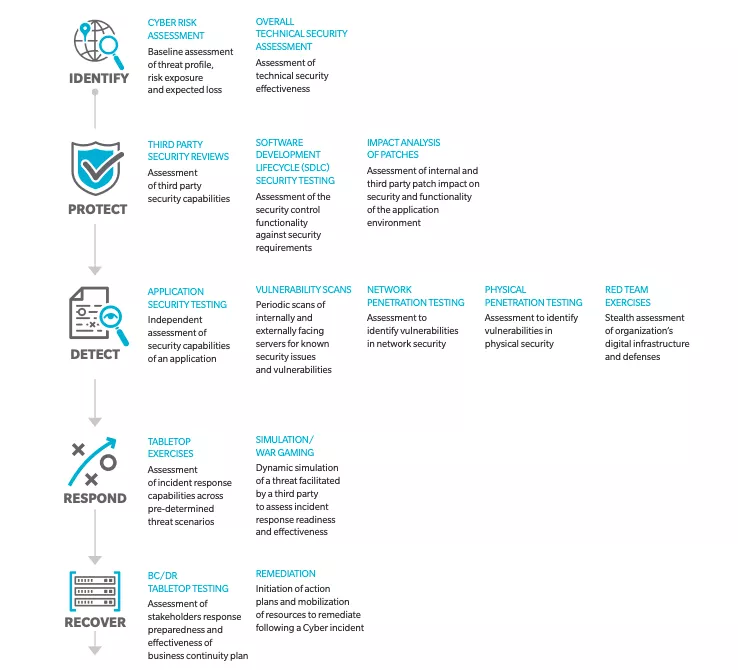
Source: Oliver Wyman As a first step, one needs to identify the risk through cyber risk assessment and an overall security assessment. Secondly, conduct third-party reviews, evaluate security control functionality against security requirements, and assess the internal and third-party impact on security. As a third step, regularly scan internally and externally facing servers for known security issues, along with network security. Then, estimate how well-prepared your team is during tabletop exercises, making sure everyone involved knows their responsibilities in a crisis. And lastly, evaluate the overall effectiveness of your BCDR plan, and how finalized your strategy is should remediation efforts be required.
4. Test Your Cyber Risk Readiness
An organization needs to prepare an incident response plan to become more resilient in the face of a cyberattack. It must extensively cover different attack scenarios, each department’s accountability, response strategy, and all necessary crisis communication scenarios. Continuously testing your incident response plan during a tabletop exercise or a drill can provide invaluable insight. A tabletop exercise allows stakeholders to walk through specific attack scenarios relevant to their business to test their readiness. Such exercise provides avenues for stakeholders to face more realistic aspects of cyber risk and their roles in the event of a crisis. However, incident management plans must be regularly reviewed and improved depending on the ever-evolving threat landscape.
The healthcare industry is facing unprecedented threats. The sector, including hospitals and medical facilities, has been identified as one of the most vulnerable to cyberattacks.
Almost 50 million patient records were affected by a major healthcare data breach in 2021 . In one of the latest, Tenet Healthcare reported an April cyberattack they estimate would cost $100 million to mitigate. Tenet Healthcare is a large healthcare organization headquartered in Dallas, Texas, with 60 hospitals, 465 ambulatory surgery centers, and 110 other outpatient centers. Tenet Healthcare was the victim of a cyberattack that caused significant IT outages. Tenet "immediately suspended user access to affected information technology applications, implemented extensive cybersecurity protection protocols, and swiftly took steps to restrict further unauthorized activity," according to a notice dated April 26.
Threats in Healthcare Cyberattacks
Recently, the healthcare industry has been under attack by cybercriminals. Forty-five million individuals were impacted by healthcare-related cyberattacks in 2021, up from 34 million in 2020. According to one report , which examines breach data reported to the US Department of Health and Human Services (HHS) by healthcare organizations, this number has tripled in just three years, rising from 14 million in 2018 to 42 million in 2019. The total number of individuals affected has increased by 32% since 2020, indicating that more records are compromised annually. The healthcare sector is a target for hackers because of the widespread use of electronic medical records and other sensitive data that can be used for financial gain or to perpetrate identity theft. The following are some areas that these attacks have impacted:
- – Patient privacy: Health information is highly personal and confidential. Hackers can use this data to steal identities, blackmail individuals, and/or extort them using private information such as social security numbers. They may also sell your health information on dark web marketplaces to bad actors who want to commit fraud or extortion against you or your family.
- – Medical records: This includes patient files like lab reports; X-rays; physician notes; prescription information etc., stored in both hard copy format as well as digital form. These documents contain sensitive information about a person’s medical history, including their disease status, treatment regime details, etc., which could lead to identity theft if an unauthorized party with malicious intent is accessed.
How Are Cyberattacks Affecting the Healthcare Industry?
Cyberattacks on healthcare organizations can result in a loss of life and cause a loss of money, reputation, and data. In the most recent cyberattack on healthcare facilities, hackers gained access to patient medical records at hospitals across the US and Canada. In some cases, they could potentially steal credit card information from patients who used their cards at those facilities. This fraud is just one example of how cyberattacks can negatively impact your business continuity strategy.
How Business Continuity Planning and Disaster Recovery Can Help Mitigate the Effects of Cyberattacks
Cyberattacks are evolving and becoming more sophisticated. To ensure your critical systems are protected, you must establish a business continuity management plan (BCMP). Business continuity planning is developing systems of prevention and recovery to protect an organization from potential threats. It's the framework for establishing organizational resilience and preparedness; business continuity planning aims to ensure continued operations before, during, and after an incident.
- – Identify and prioritize business processes to define the plan(s) you require; conduct a risk assessment to identify and quantify threats.
- – Define your business continuity strategy and develop a plan.
- – Maintain the program – update risk assessments, business impact analyses, and plans; ensure awareness and validate plans with regular exercises.
Business Continuity Plans Help Keep You Running in the Event of a Cyberattack
Business continuity plans (BCP) are an essential step toward ensuring your organization's ability to recover from a cyberattack. A BCP defines how a company will maintain operations during an interruption. A robust BCP aims to keep a company's core processes operational during a disaster and minimize downtime. A business continuity plan may consider various scenarios, including natural disasters, wildfires, cyberattacks, workplace violence, and isolated incidents.
Three Strategies To Mitigate Healthcare Cyberattacks
Three key strategies can help keep you running in the event of a cyberattack :
Emergency notifications
Emergency notification systems are indispensable when responding to a disaster and restoring operations after a disruption. Part of these plans should include alerting employees about security incidents so they know how best to proceed until IT personnel can get things back up and running. For instance, the repercussions could be severe if a cyberattack occurred in an office where employees lacked the necessary training and did not immediately report the incident. It would be impossible to maintain business continuity, and the organization could suffer significant property, asset, and resource loss.
Disaster recovery as a service (DRaaS)
If your company relies heavily on technology, purchasing additional backup data storage services from external providers might be wise in case something goes wrong at your office location(s).
Business Continuity Plans Are Critical for Hospitals
With the rise of ransomware and other cyberattacks, it's more important than ever for hospitals to have a business continuity plan in place. BCPs help an organization continue operations after a disaster or other disruptive event. However, according to research commissioned by IBM and Ponemon Institute , only 43% of healthcare organizations surveyed had documented business continuity plans, putting them at risk of experiencing significant downtime. When you think about your own healthcare experience as a patient, you probably want:
- – A hospital that is free from infection
- – A hospital with competent employees who know how to care for you
- – A hospital that will be able to ensure your privacy
A business continuity plan helps ensure these things are possible during an emergency like a cyberattack.
Conclusion
The healthcare industry is being hit hard by cyberattacks, but there are ways to protect your organization. Developing a business continuity and recovery strategy is a strong first step, but testing that plan is critical to your recovery success. Need help getting started? Agility Recovery is here to help .